Categories
Uncategorized

GSoC 2026 Final Report

Porting iBASS engine to ScummVM 

Organisation: ScummVM

Contributor name: Priyanshu Kumar

Coding period: 25 May 2026 – 17 August 2026

Over the past few months, I had been working on implementing support for the remastered version of Beneath a Steel Sky in ScummVM’s sky engine and in this final report, I am giving a brief description of what has been done, what is underway and what is yet to be done.

The goal of this project was to incorporate the changes done by the developers of iBASS into the sky engine upstream. That included the enhanced ui icons, separate inventory pathway, enhanced cutscenes including the intro and outro and many more things which I am happy to say that I have largely completed. Now, the game can be played from beginning to the end with minor bugs remaining that I will be working on fixing in the near future.

What’s completed(attaching the work below)-

1. Initial support – Added ibass to detection, overlayed the icons, implemented the mouse input pipeline for ibass and some work on the inventory.

PR – https://github.com/scummvm/scummvm/pull/7565

2. Implemented text chooser

PR – https://github.com/scummvm/scummvm/pull/7634

3. Skip checking for the sky.dnr file for ibass

PR – https://github.com/scummvm/scummvm/pull/7640

4. Fix transparency in inventory icon

PR – https://github.com/scummvm/scummvm/pull/7641

5. Added CgBI decoder to decode the CgBI PNGs for the hint system’s window and implemented the hint system.

PR – https://github.com/scummvm/scummvm/pull/7811

6. Implemented the intro and outro cutscenes and also stretched the graphics to 480X320.

PR – https://github.com/scummvm/scummvm/pull/7850

7. Added hotspots

PR – https://github.com/scummvm/scummvm/pull/7853

And here is the link to all the blogs I wrote during this journey –

https://blogs.scummvm.org/priyanshu/

PRs 5, 6 and 7 are unmerged at the time of writing this report and are subject to review.

What’s yet to be done –

1. There are a few crashes here and there that I need to identify and fix.

2. The hint system needs some more refinement.

3. Support for different languages in the hint system.

4. Extensive testing after stretching the graphics to ensure smooth transition of the game to 480X320 and fix the discrepancies on the go.

This sums up my GSoC 2026 journey and I learnt a lot in these past few months. I would like to extend my gratitude to the whole ScummVM team for supporting, guiding, helping and keeping a check on my work. Special thanks to Eugene Sandulenko and John Willis for mentoring me and for always being there when I needed their help. Looking forward to continue working with such a wonderful and passionate group of people on more such projects.

And to all my readers and those who want to defeat LINC-

BE VIGILANT 😉

Thanks for reading 🙂
Categories
Uncategorized

Week 13

Welcome back to the blog. The intro and the outro videos have been implemented and the PR is created. I remember writing in the last week’s blog that I will start testing the videos on the qtdecoder but the video and audio codecs of that format were not supported on scummvm’s qtdecoder. So, the mentors suggested re-encoding the videos to one of the formats that have their decoders implemented in scummvm and sev gave me some options out of which I chose to re-encode them to svq1(one of the reasons being that I was too lazy to write the decoding pipeline for another format and since I already had written it for qtdecoder to test the original assets and that svq1 was one such format that qtdecoder decoded😅). And then we got the intro-

Can’t post the whole intro since it will be too long but here is the beginning.

And this is the outro-

“Copyright 1994 Revolution Software Limited” marks the end of the post credits and then the outro starts.

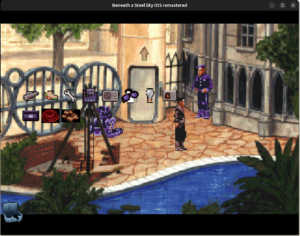
These intro and outro videos have a resolution of 480X320. sev suggested to keep that resolution and stretch the graphics of the game to match that instead so that it makes the inventory icons look better on the screen as opposed to previously, wherein they appeared a bit large.

This is how they look now-
And the final evaluation timeline has officially started. So, I will now be writing the final report detailing about what all has been done, linking to the PRs and what is yet to be done.
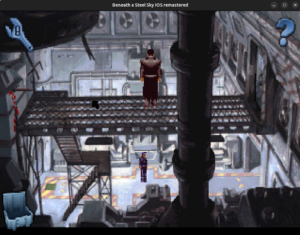
Thanks for reading 🙂

Categories
Uncategorized

Week 12

Starting to write this blog with a great news that the PR implementing the CgBI decoder as well as the hint system has been created. I just finished the last touch up of the hint system and then pushed it. How long it takes before it gets merged now is subject to review.

While implementing the hints, I encountered many cases where, due to many hints for a single question, the hints did not fit on the screen all at once. So, I implemented a button to go down to the bottom so that the user can view the hints fully.

This is how the hint system is working. As you can see, the moment the hints go beyond the bottom edge, the “down” button appears.

Next, I will be implementing the intro and outro videos. Those videos are in a format named “m4v”, which, as I understood by reading about it, is just an mp4 container only but with a different extension, created by apple. It uses the aac audio and h264 video codec. I am not completely sure if our existing decoders would be able to decode this format but during the time I had started working on this project, I’ve had a discussion with @sev on this topic and he thinks that our quicktime decoder would be able to decode it.

So, I will start attempting to decode it with quicktime only.

Thanks for reading 🙂

Categories
Uncategorized

Week 11

Welcome back to another blog. Last week, I primarily worked on the text rendering inside the help panel that includes hint questions and their respective answers(hints).

The help panel provides us with hints in the form of questions and clicking on each question provides us with some hints in the forms of answers to those questions. I am currently testing the whole pipeling with one test case i.e. “How do I get out of the furnace room?” which is the case 3 in the hint system’s state machine implement in the function Control::buildHints() in control.cpp.

The question and answers are implemented in the form of a struct Hint that contains an integer for storing the question’s number and an array of integers for storing the answers indices. The questions and answers are implemented in an array of strings in ibasstext.cpp

And the font rendering is done in a method named initHelpPanel(). For the rest of the questions and answers, we have the placeholder(“?”). The hint system for the furnace case looks like this-


Clicking anywhere else than the answer’s rect clears the answers(think of it as a back button to the question). And, to close the hint panel, we hit the esc button.

After fully implementing the hint system’s pipeline end to end and testing with the furnace case, I will now be porting rest of the cases too. And just like english, it has support for many different language like Spanish, Italian etc. adding whose support for the hint system I am considering in the longer run. See you in the next blog.

Thanks for reading 🙂

Categories
Uncategorized

Week 10

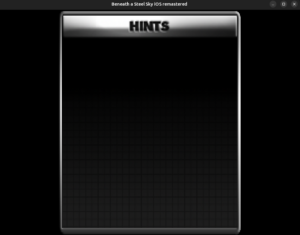
Welcome back, the CgBI decoder is up and loading the assets wonderfully, see-

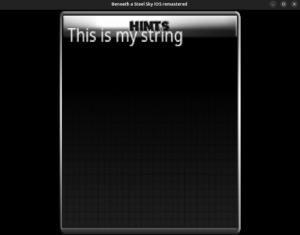
I am currently rendering text on it which is too close to be completed too. The text is rendered like this

I have already ported the required infrastructure for the hint system that includes methods like setSeenScreen and hasSeenScreen which, as their names suggest, sets the screen to true and tells if the screen is set respectively. It tracks that using a boolean array _seenScreen. Similar methods and array are there for the hint answers too. The hint lookup table is almost completed too. You’ll see that in the next blog.

Once the hint system gets implemented, I will most likely be moving to the implementation of the intro and outro videos. After that, I’ll implement the audio.

There’s hotspost too which is yet to be implemented. So, I’ll have to do that too. See you next week.

Thanks for reading 🙂

Categories
Uncategorized

Week 9

As I mentioned in the last week’s blog, the game assets have CgBI PNGs in it which we need to decode.

Initially, I thought about converting it to a standard PNG to have the PNGDecoder decode it but since we have the raw pixels extracted, we can just draw the surface.

How different is the CgBI format than standard PNG

Apple had created this format to optimize for the native pixel format of the iPhone’s early PowerVR GPUs. It contains significant differences like-

  • An extra critical chunk(CgBI) – Right after the 8 byte standard PNG header and 4 bytes for length, CgBI format has also a CgBI type field from bytes 12-15.
  • Swapped pixel format – Instead of a standard PNG file’s pixel format, i.e., RGBA, CgBI format has the pixel format swapped to BGRA. The red and the blue channel are swapped, presumably for high speed direct blitting to the framebuffer.
  • It contains raw deflate data. It has the zlib header, footer removed from the IDAT chunk.
  • It has every channel pre-multiplied with the alpha channel.
  • Pre-multiplied with the alpha channel during encoding: color’ = color * alpha / 255

I have extracted the raw pixels by removing the CgBI header, un-premultiplying the alpha channel and swapping the red and blue channel all while working on raw deflate data. Next, I will be drawing the surface and we’ll have the help window displayed on our screen. The immediate next step after that would be to render the help contents on it. Hopefully, I will be briefing about that in the next blog 😉

Thanks for reading 🙂


Categories
Uncategorized

Week 8

We are past the mid-term now which means half of the GSoC season has come to an end and we have started on the second half. I overlayed the “Options” icon and the “Help” icon.

The wrench is for the “Options” that’s essentially the control panel and the help icon is for the hint system. It has a bunch of questions depending upon the part of the game we are in and a few hints for that question.

For an example –

Q – The Firedoor is locked – how do I open it?

A – Get the rung from the top of the stairs on the left of the gantry.

Open your inventory and use the rung on the fire door to lever it open.

The original source code uses a huge switch block to map the questions to the answers. I will be taking the same approach when I implement the text in ScummVM.

So, we load the help window and render the text on it.

But another challenge comes just at that point. The game assets are not standard PNG files but rather, a non standard variation of the PNG format optimized by Apple for iOS devices. It is called the CgBI format.

Since we depend upon libpng to decode our PNG files, CgBI files cannot be decoded since libpng doesn’t support them. To tackle this issue, we have decided to write a CgBI to standard PNG converter. We already have a program to do that which was shared by my mentor, @DJWillis.

I am currently studying it to understand how it’s doing it since I have a very limited experience in decoding.

Once I understand it, I will port it to ScummVM in the image/ directory where all the other image format decoders live, so that it can also be used in the future for any other games if needed.

After we have the decoder and we load the empty help window, we will proceed with adding the text.

Thanks for reading 🙂

Categories
Uncategorized

Week 7

Welcome back, happy to be writing back after so long. I’ve got myself on the work again and there’s 2-3 days of progress I want to brief about. But before that, I must inform that the initial PR for iBASS support has been merged(it was merged while I was away), which means that now you can play iBASS on the debug builds. All you need to arrange are the game files. Continuing the efforts of porting, I implemented the text chooser(the PR is currently opened). But first let’s understand what exactly is the text chooser.

Text Chooser

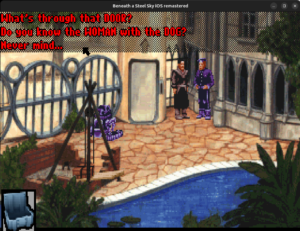
See the questions at the top. When we talk to the NPCs, a list of questions in this form appears. We have to select a dialogue from this list.
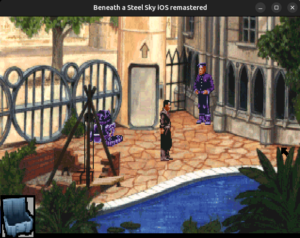
This is how it works.

The PR is currently opened. Once it gets merged, you’ll be able to use this feature.

The silent killer

Day before yesterday, while I was implementing the text chooser, the game crashed on starting. I was lucky that I had run that time with gdb so I recorded the backtrace-

Thread 1 “scummvm” received signal SIGSEGV, Segmentation fault.
0x000055555924128a in READ_UINT16 (ptr=0x55555ed36000) at ./common/endian.h:209
209 return ((const Unaligned16 *)ptr)->val;
(gdb) bt
#0 0x000055555924128a in READ_UINT16 (ptr=0x55555ed36000)
at ./common/endian.h:209
#1 Sky::Disk::getFileInfo (this=0x55555e4a7640, fileNr=60600)
at engines/sky/disk.cpp:310
#2 0x0000555559240c60 in Sky::Disk::fileExists
(this=0x55555e4a7640, fileNr=60600) at engines/sky/disk.cpp:169
#3 0x000055555922e5c6 in Sky::SkyEngine::init (this=0x55555e48dec0)
at engines/sky/sky.cpp:462
#4 0x000055555922f0f1 in Sky::SkyEngine::run (this=0x55555e48dec0)
at ./engines/sky/sky.h:130
#5 0x00005555560e808c in runGame
(enginePlugin=0x55555d3d2f60, system=…, game=…, meDescriptor=0x0)
at base/main.cpp:328
#6 0x00005555560ea70d in scummvm_main (argc=1, argv=0x7fffffffde28)
at base/main.cpp:840
#7 0x00005555560e4d84 in main (argc=1, argv=0x7fffffffde28)
at backends/platform/sdl/posix/posix-main.cpp:56

the getFileInfo function reads from a variable named _dinnerTableArea that is never written to in iBASS since iBASS doesn’t have a separate sky.dnr file.

So, the game starts successfully most of the time because it contains garbage. If it doesn’t, the game crashes. To fix this, I used the getEntry() method.

That’s all for this blog. See in the next post.

Thanks for reading 🙂

Categories
Uncategorized

Week 4

Hey there, welcome back to the blog. The inventory is fully implemented and hence, we’re now able to drag the rung and open the fire exit, hurray.

Other than this, there’s no way to get out of this scene(except if you use the debugger console 😉 ).

Also if you notice, I have revived the original cursor of Beneath a Steel Sky here too.

Ever since I started the development on iBASS, I had turned the engine to 32 bits for both BASS and iBASS. Since the original beneath a steel sky featured an 8 bit colour depth, sev suggested to revert it back to make BASS run in 8 bpp mode which I successfully did. Now, BASS is running in 8 bpp and iBASS in 32 bpp.

There was one more crash I encountered at this phase of the game-See the cursor at the right edge of the window? That is the exit. But when I clicked on it, it hit this assert. To fix this, I guarded this call to never draw out of the boundary of _screen32.
I also performed some refining in the LINC terminal.

Major tasks that are still left to be done include implementing the text chooser. Here’s a snippet from the original Beneath a Steel Sky regarding the text chooser-

Currently, we cannot do this in iBASS. Some other tasks yet to be done include fixing the transparency issue in the inventory icon, render the cog icon for the control panel on the top left, etc. All this while we have no audio yet along with the intro and the outro.

Also, I had an important announcement to make. I’ll be away for the next few weeks due to some personal reasons. As agreed with my mentor, I will be unavailable from 13 June to 3 July. I’ll be catching once I return. Thanks, and talk to you all in a few weeks.

Thanks for reading 🙂

Categories
Uncategorized

Week 3

Hello again, we are into the 3rd week and I spent the last week working to finish the inventory and we are almost there. So, the inventory has four states depending upon how long the inventory item has been clicked for and where on the screen the click is recorded. In simpler terms-


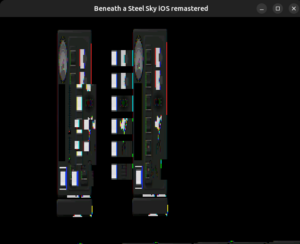
And, if you remember from the first blog, we had converted the engine to 32-bit and we talked about the main game screen that was an 8-bit buffer and we merged them together before the screen output. The control panel has a separate screen and naturally, it was also an 8-bit screen. When the menu was built in an 8 bit buffer but passed directly to a 32 bit renderer, we got this-So naturally, just like with the main game screen, we let the menu to build its 8 bit layout but merge it before rendering.
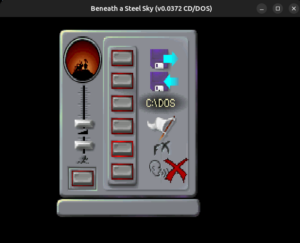
Currently, I am working on the dragging part of the inventory items which I will brief about in the next blog.

Thanks for reading 🙂