Categories
Uncategorized

Week 9

As I mentioned in the last week’s blog, the game assets have CgBI PNGs in it which we need to decode.

Initially, I thought about converting it to a standard PNG to have the PNGDecoder decode it but since we have the raw pixels extracted, we can just draw the surface.

How different is the CgBI format than standard PNG

Apple had created this format to optimize for the native pixel format of the iPhone’s early PowerVR GPUs. It contains significant differences like-

  • An extra critical chunk(CgBI) – Right after the 8 byte standard PNG header and 4 bytes for length, CgBI format has also a CgBI type field from bytes 12-15.
  • Swapped pixel format – Instead of a standard PNG file’s pixel format, i.e., RGBA, CgBI format has the pixel format swapped to BGRA. The red and the blue channel are swapped, presumably for high speed direct blitting to the framebuffer.
  • It contains raw deflate data. It has the zlib header, footer removed from the IDAT chunk.
  • It has every channel pre-multiplied with the alpha channel.
  • Pre-multiplied with the alpha channel during encoding: color’ = color * alpha / 255

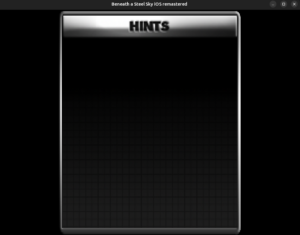
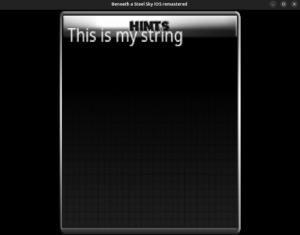
I have extracted the raw pixels by removing the CgBI header, un-premultiplying the alpha channel and swapping the red and blue channel all while working on raw deflate data. Next, I will be drawing the surface and we’ll have the help window displayed on our screen. The immediate next step after that would be to render the help contents on it. Hopefully, I will be briefing about that in the next blog 😉

Thanks for reading 🙂


Categories
Uncategorized

Week 8

We are past the mid-term now which means half of the GSoC season has come to an end and we have started on the second half. I overlayed the “Options” icon and the “Help” icon.

The wrench is for the “Options” that’s essentially the control panel and the help icon is for the hint system. It has a bunch of questions depending upon the part of the game we are in and a few hints for that question.

For an example –

Q – The Firedoor is locked – how do I open it?

A – Get the rung from the top of the stairs on the left of the gantry.

Open your inventory and use the rung on the fire door to lever it open.

The original source code uses a huge switch block to map the questions to the answers. I will be taking the same approach when I implement the text in ScummVM.

So, we load the help window and render the text on it.

But another challenge comes just at that point. The game assets are not standard PNG files but rather, a non standard variation of the PNG format optimized by Apple for iOS devices. It is called the CgBI format.

Since we depend upon libpng to decode our PNG files, CgBI files cannot be decoded since libpng doesn’t support them. To tackle this issue, we have decided to write a CgBI to standard PNG converter. We already have a program to do that which was shared by my mentor, @DJWillis.

I am currently studying it to understand how it’s doing it since I have a very limited experience in decoding.

Once I understand it, I will port it to ScummVM in the image/ directory where all the other image format decoders live, so that it can also be used in the future for any other games if needed.

After we have the decoder and we load the empty help window, we will proceed with adding the text.

Thanks for reading 🙂

Categories
Uncategorized

Week 7

Welcome back, happy to be writing back after so long. I’ve got myself on the work again and there’s 2-3 days of progress I want to brief about. But before that, I must inform that the initial PR for iBASS support has been merged(it was merged while I was away), which means that now you can play iBASS on the debug builds. All you need to arrange are the game files. Continuing the efforts of porting, I implemented the text chooser(the PR is currently opened). But first let’s understand what exactly is the text chooser.

Text Chooser

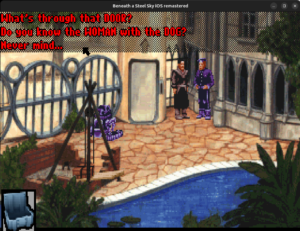
See the questions at the top. When we talk to the NPCs, a list of questions in this form appears. We have to select a dialogue from this list.

This is how it works.

The PR is currently opened. Once it gets merged, you’ll be able to use this feature.

The silent killer

Day before yesterday, while I was implementing the text chooser, the game crashed on starting. I was lucky that I had run that time with gdb so I recorded the backtrace-

Thread 1 “scummvm” received signal SIGSEGV, Segmentation fault.
0x000055555924128a in READ_UINT16 (ptr=0x55555ed36000) at ./common/endian.h:209
209 return ((const Unaligned16 *)ptr)->val;
(gdb) bt
#0 0x000055555924128a in READ_UINT16 (ptr=0x55555ed36000)
at ./common/endian.h:209
#1 Sky::Disk::getFileInfo (this=0x55555e4a7640, fileNr=60600)
at engines/sky/disk.cpp:310
#2 0x0000555559240c60 in Sky::Disk::fileExists
(this=0x55555e4a7640, fileNr=60600) at engines/sky/disk.cpp:169
#3 0x000055555922e5c6 in Sky::SkyEngine::init (this=0x55555e48dec0)
at engines/sky/sky.cpp:462
#4 0x000055555922f0f1 in Sky::SkyEngine::run (this=0x55555e48dec0)
at ./engines/sky/sky.h:130
#5 0x00005555560e808c in runGame
(enginePlugin=0x55555d3d2f60, system=…, game=…, meDescriptor=0x0)
at base/main.cpp:328
#6 0x00005555560ea70d in scummvm_main (argc=1, argv=0x7fffffffde28)
at base/main.cpp:840
#7 0x00005555560e4d84 in main (argc=1, argv=0x7fffffffde28)
at backends/platform/sdl/posix/posix-main.cpp:56

the getFileInfo function reads from a variable named _dinnerTableArea that is never written to in iBASS since iBASS doesn’t have a separate sky.dnr file.

So, the game starts successfully most of the time because it contains garbage. If it doesn’t, the game crashes. To fix this, I used the getEntry() method.

That’s all for this blog. See in the next post.

Thanks for reading 🙂