We are past the mid-term now which means half of the GSoC season has come to an end and we have started on the second half. I overlayed the “Options” icon and the “Help” icon.
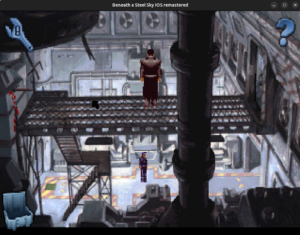
The wrench is for the “Options” that’s essentially the control panel and the help icon is for the hint system. It has a bunch of questions depending upon the part of the game we are in and a few hints for that question.
For an example –
Q – The Firedoor is locked – how do I open it?
A – Get the rung from the top of the stairs on the left of the gantry.
Open your inventory and use the rung on the fire door to lever it open.
The original source code uses a huge switch block to map the questions to the answers. I will be taking the same approach when I implement the text in ScummVM.
So, we load the help window and render the text on it.
But another challenge comes just at that point. The game assets are not standard PNG files but rather, a non standard variation of the PNG format optimized by Apple for iOS devices. It is called the CgBI format.
Since we depend upon libpng to decode our PNG files, CgBI files cannot be decoded since libpng doesn’t support them. To tackle this issue, we have decided to write a CgBI to standard PNG converter. We already have a program to do that which was shared by my mentor, @DJWillis.
I am currently studying it to understand how it’s doing it since I have a very limited experience in decoding.
Once I understand it, I will port it to ScummVM in the image/ directory where all the other image format decoders live, so that it can also be used in the future for any other games if needed.
After we have the decoder and we load the empty help window, we will proceed with adding the text.
Thanks for reading 🙂