Hi, I am Ramyak. My work centered on the Macromedia Director preservation effort in ScummVM: extending the ImGui-based visual debugger (DT), fixing engine compatibility bugs surfaced by the Gus games, implementing embedded movie cast members, and building screenshot-diff tooling into the ScummVM buildbot. All links below point to the pull requests.
Please refer to the links at the end of this post for weekly breakdowns.
Key deliverables
Movie cast members (#7752):
embedded Director movies that run as parallel sprites, managing separate execution states while sharing global variables.
Visual Debugger:
Major features and changes in debug tools like:
Lingo execution tracer (#7816):
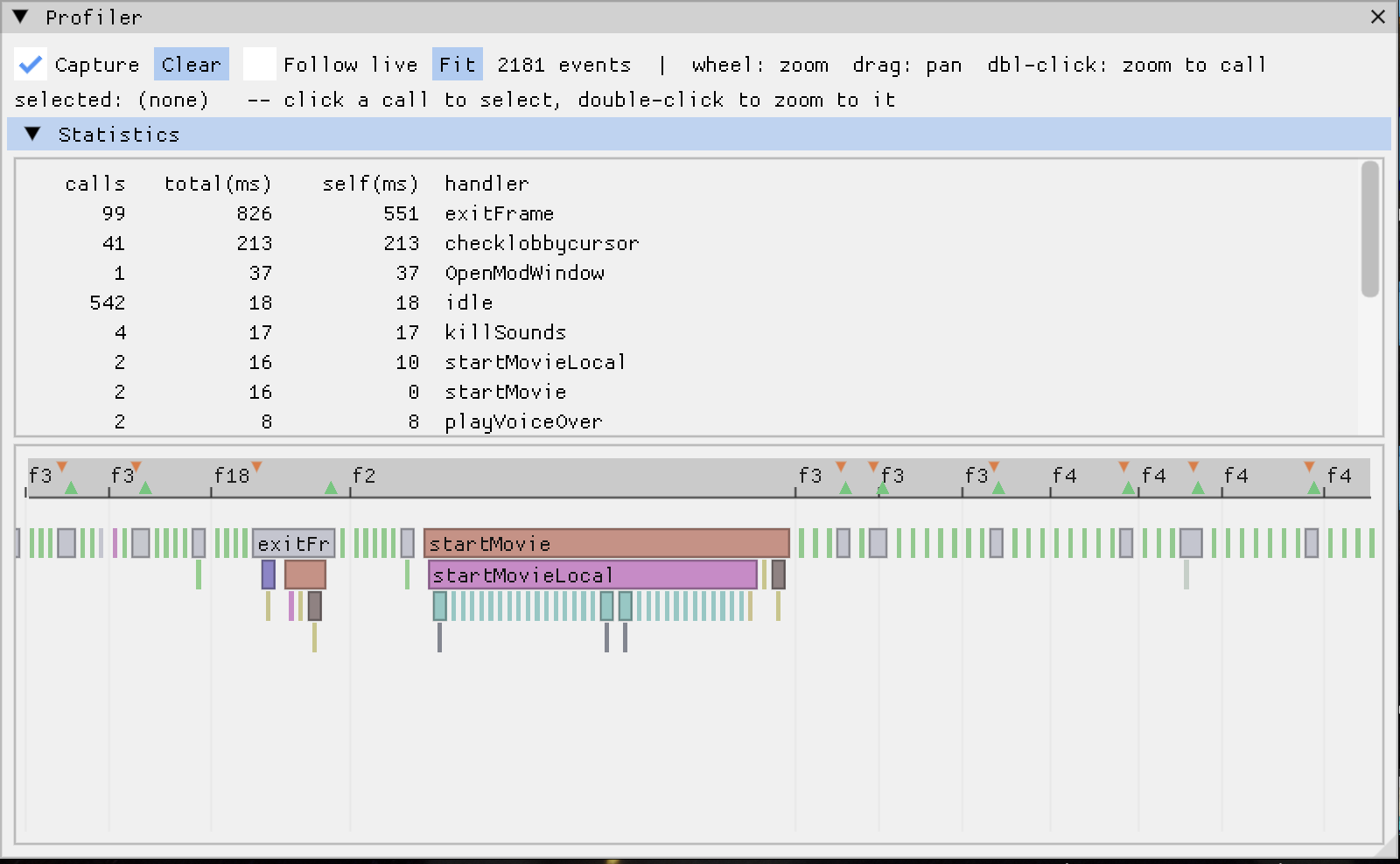
a flamegraph view inside the debugger that records Lingo execution for performance and control-flow analysis.
ImageDiff on buildbot:
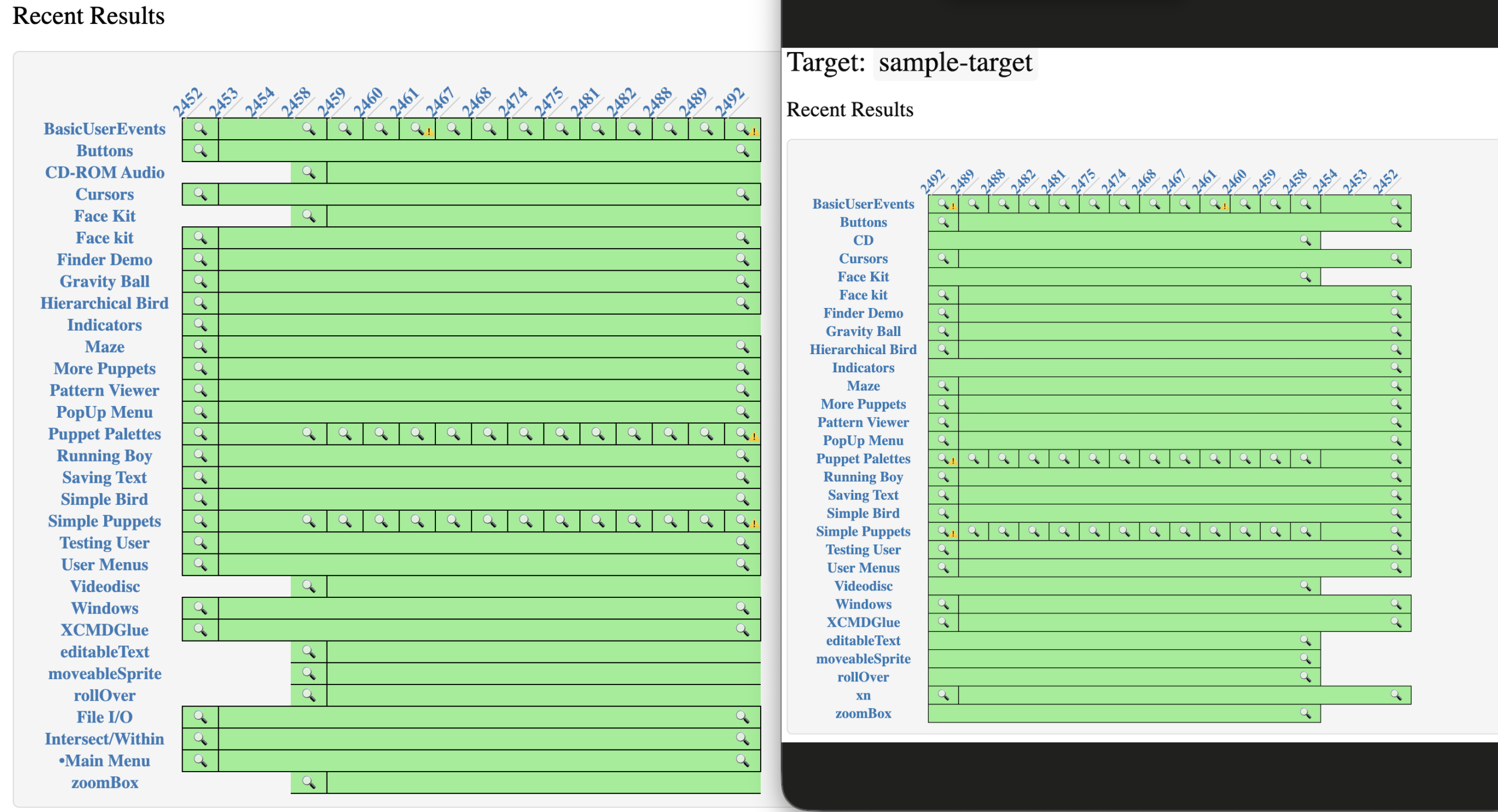
brought screenshot-diff regression testing into the ScummVM buildbot dashboard, plus a set of Director regression test movies, so rendering changes can be caught visually.
pic of the tool from dev chat
Games compatibility:
Mostly for gus games: detection entries and a series of engine fixes (film loops, mouse dispatch, digital video, sound channels) that make the Gus titles playable. Some work was also done on trektech. The goal initially also included The Journeyman Project but since there were a lot of bugs in gus games, I did more work there instead.
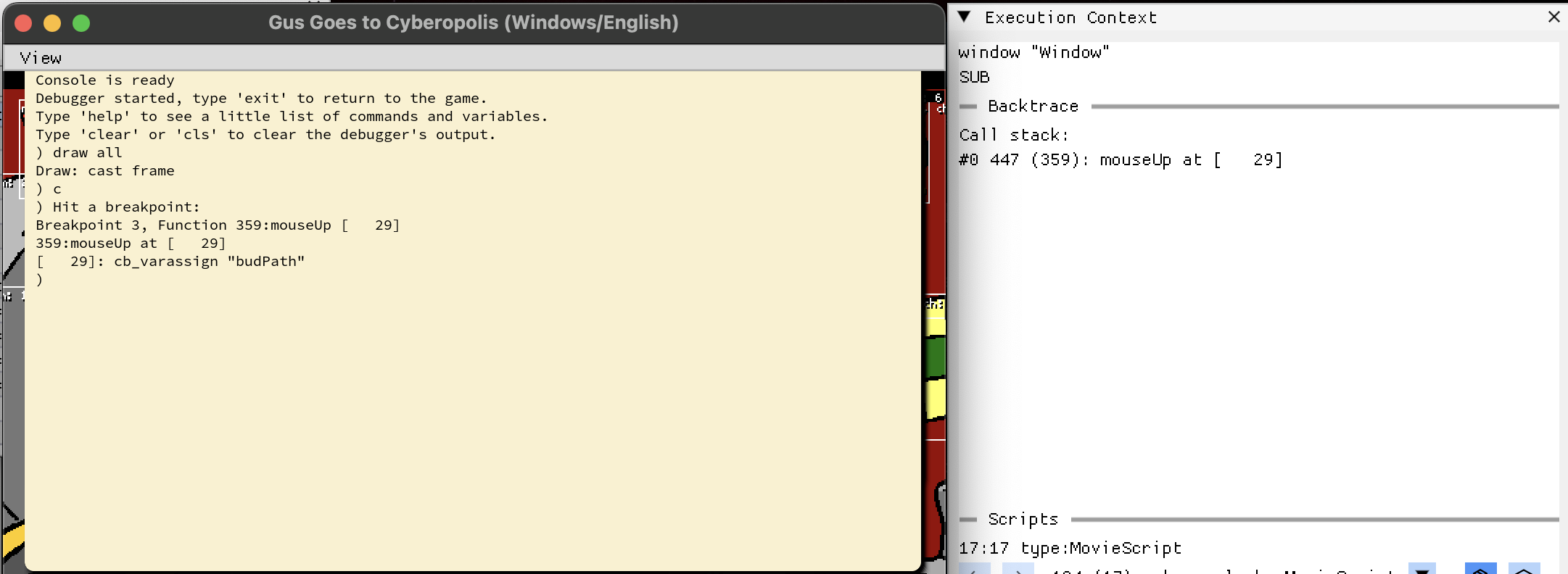
movie paused at a breakpoint
Before the coding period I made around 10 contributions building the initial Director visual debugger and fixing film loop rendering, which laid the groundwork for the GSoC work.
Most of the PRs below are merged, three are in review.
Director visual debugger (DT)
#7553 Fix bugs and crashes throughout the visual debugger
This week was mostly about one thing: finishing the remaining Gus game bugs.
Gus Paint
One of the bugs was in the inside() Lingo function, which was causing the Paint and Play buttons in Gus Paint to crash. I found the fix, but it was slightly wrong in its assumptions. I figured that out a couple of days later when I looked at it again and made the required change.
The game passes a proper POINT and the rect of cBackground, but cBackground is temporarily VOID during the first few frames. This meant inside() received (POINT, VOID) and fell through without returning a value, causing a fatal error.
Fixed it to return FALSE for invalid arguments instead of crashing. Sev also suggested using the existing TYPECHECK macros for handling the different argument types.
There were some other smaller bugs I worked on, like a textbox getting disproportionally larger incrementally with text input. funniest bug so far. fixed it. This one along with some more bugs, will be listed in the PR.
I spent a lot of time simply going through the games and reproducing things that looked wrong.
Over the last few weeks I have gradually gotten better at narrowing those problems down. Instead of immediately assuming that the game itself is doing something unusual, I can now usually trace the failing Lingo call into the engine and figure out what assumption ScummVM is making that the original Director did not.
Looking back
This week was mostly about cleanup: playing through games, finding the remaining failures, tracing them into the engine, and getting them into a state where they can be fixed properly.
And with that, GSoC is coming to an end.
Over the last 12 weeks I have worked on a fairly wide range of things in the Director engine: the ImGui visual debugger, movie cast members, film loops, Lingo debugging and profiling, ImageDiff and buildbot integration (-_-), game detection, and a lot of small engine and game compatibility fixes.
It has been a pretty different experience from working on a normal project. A lot of the time I was dealing with code and file formats that are decades old, trying to figure out not just what the original game is doing, but what Director itself must have been doing underneath it.
I’ll soon be posting a separate write-up covering the work I did over the full 12 weeks.
Because they need some testing, I”ll push the PR for the bugs soon. (Updating soon)
So the highlight of this week is, as the title suggests, the Lingo tracer. I mentioned it in a recent blog. When I shared a screenshot with sev of the prototype I made, he said it seemed like a good idea and green lit it. This week was spent mostly on it, and getting it working was not that hard. The hard part was making it easy to use and understand.
The tracer records Lingo as it runs: every handler that gets called, when the score changes frames, and when a script is frozen and later resumed. It draws all of that as a flamegraph inside the ImGui debugger, so you can see which handlers ran, how they nested, and how long each one took. There is also a small stats table that sums the total and self time per handler, so the expensive ones are easy to spot. It stays off until you tick Capture, so it costs nothing when you are not using it.
Most of my time went into the reading experience. Frames and freeze/thaw markers sit in a thin strip at the top so the flamegraph below stays clean, tiny sub-pixel slices get merged so a busy trace does not turn into noise, and hovering one call highlights every other call with the same name.
fix
The other fix this week was a sound bug in gusmuse. Entering or leaving an area stacked the music tracks on top of each other, and the previous one never stopped.
In Director the sound channels are one shared resource between the Stage and any movie-in-a-window, but in ScummVM each window had its own sound manager, so a track started from one window could not stop a track from another.
I routed every window’s sound through the Stage’s manager, and now the channels are truly global.
Mostly a normal week: two engine bugs, and a lot of sharpening the ImGui debugger.
Bugs.
Fixed the Cybertown cyberbud trails vanishing. The dirty channel check was comparing the raw _thickness byte, so a flipped tween bit falsely dirtied the channel and erased the trail. Fixed the Sink-or-Float “Prof. Gus’ face” (Talked about it here: week 5): a digital-video sprite the score sizes to 0×0 (an invisible timing clock) was being blown up to its native 240×180, so now it stays invisible. Also null-guarded a crash in endOfVideo().
Debugger (DT).
A sweep of bugs and quality of life fixes: killed ImGui::Text format string crashes in the script viewer, added some keyboard shortcuts, cached the cast browser rows, made the cast list sortable, added a Vars filter and copy value, refreshed stale thumbnails, added a movie cast member score viewer and a lot of other changes.
Lingo profiler.
I also spent part of the weekend on an experimental feature (for fun), a profiler for Lingo. It is still early, and I will come back to it later. For now the focus is wrapping up the Gus games.
Gus games status
gustown, guscarn: done
gusolis: 90% done
gusmuse: in progress
guspaint, guspark: remaining (still need to check how many bugs survive all the recent changes)
Most of a Director game is one movie playing at a time. You leave one, you enter the next, and the engine only ever has a single score ticking over. But Director also lets a cast member be another whole movie (a “movie cast member”, #movie in Lingo) that runs in parallel, inside a sprite, while the host movie keeps going around it. This week I made ScummVM actually do that.
Director’s vocabulary, quickly: a movie is a timeline (its score) of frames. Each frame has numbered channels, and a sprite sitting in a channel is one on-screen instance of a cast member, an asset from the movie’s library. The stage is the window everything draws into, and Lingo is Director’s scripting language.
The thing that forced the issue is the mini-map in Star Trek: TNG Interactive Technical Manual. You walk the decks of the Enterprise-D in a QuickTime VR panorama, and in the corner there’s a little schematic of the deck with a marker showing where you are. That mini-map isn’t a picture the host draws: it’s a separate Director movie, linked in as a cast member, running its own scripts, watching a shared global to know where the marker goes, and setting another global to send you somewhere when you click it. Get movie cast members working and the mini-map comes alive. That was the goal.
By the time the mini-map worked I had three problems on my list that looked entirely unrelated, to each other and to it: the host’s caption text had stopped drawing, the input queue was growing without bound, and DT, the debugger, was flickering between two movies’ scores several times a second. I assumed three bugs. Underneath, they were one.
A cast member that drew nothing
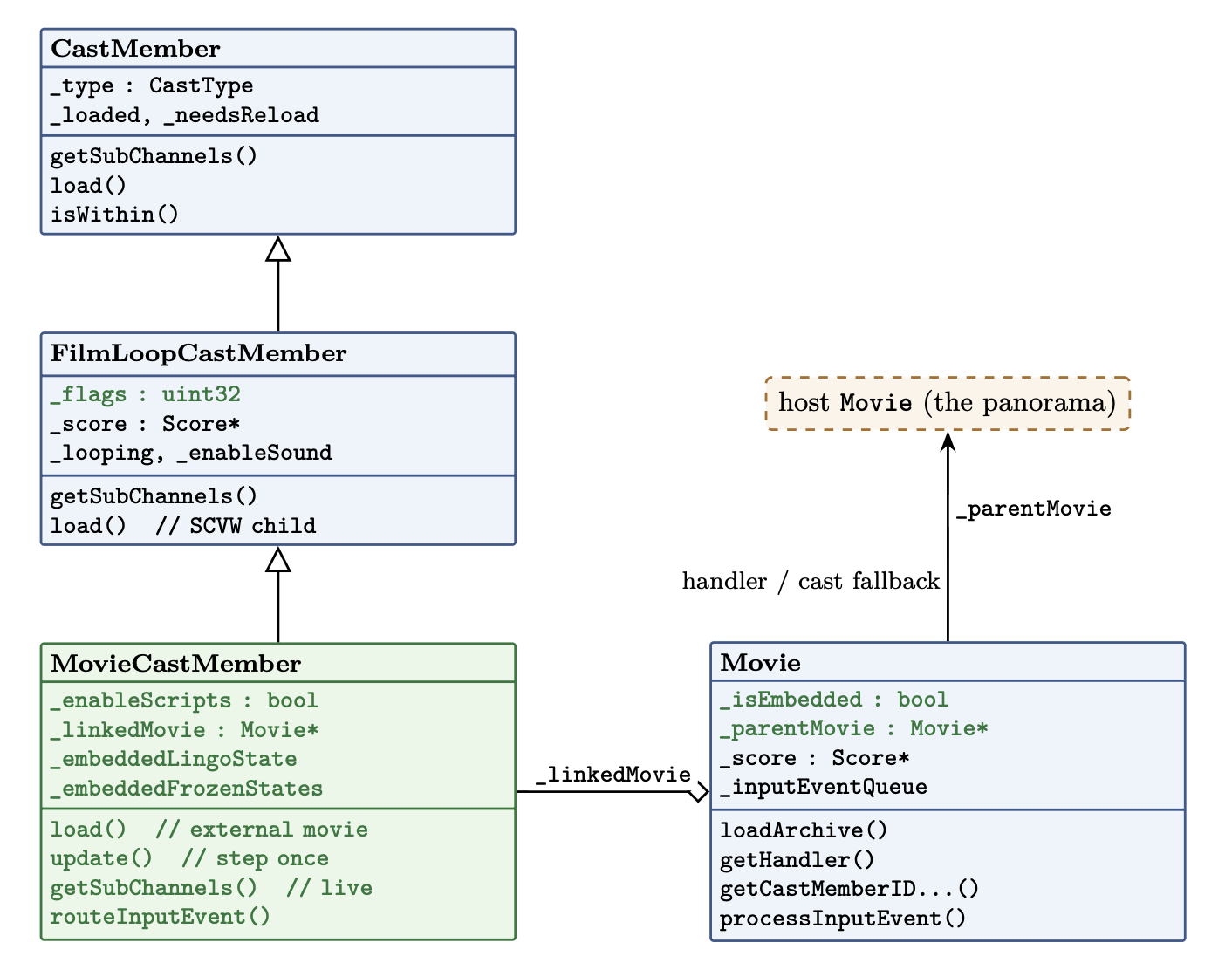
Movie cast members and film loops share the exact same layout on disk. The only real difference is a single flag: a film loop is a canned animation, a movie cast member runs its own Lingo (scriptsEnabled). Because of that shared format, ScummVM already modelled MovieCastMember as a subclass of FilmLoopCastMember, and inherited the film loop’s loader, which looks for an embedded SCVW resource. A movie cast member doesn’t have one. Its content lives in a separate movie file, named in the cast info. So the loader found nothing, and the cast member drew nothing at all.
The first job, then, was a real load(): take the linked path out of the cast info, resolve it with findMoviePath, open the archive, and build a proper Movie out of it that the cast member owns. Point the inherited _score at that movie’s score and suddenly there are frames to draw.
There was also a bug. The moment the linked movie loaded, the whole stage resized itself to the mini-map’s dimensions and the panorama vanished. A movie, when it loads, assumes it owns the stage: it resizes the window, recentres it, repaints the background colour. That’s correct for a movie you open normally, and completely wrong for one living inside a sprite on someone else’s stage.
The fix is a flag, Movie::_isEmbedded, set on the linked movie. Anywhere loadArchive() reaches for the stage, it now checks that flag first and leaves it alone. An embedded movie borrows the host’s window; it never gets to own it. That flag turns out to be load-bearing: it comes back to guard rendering twice more before this is over.
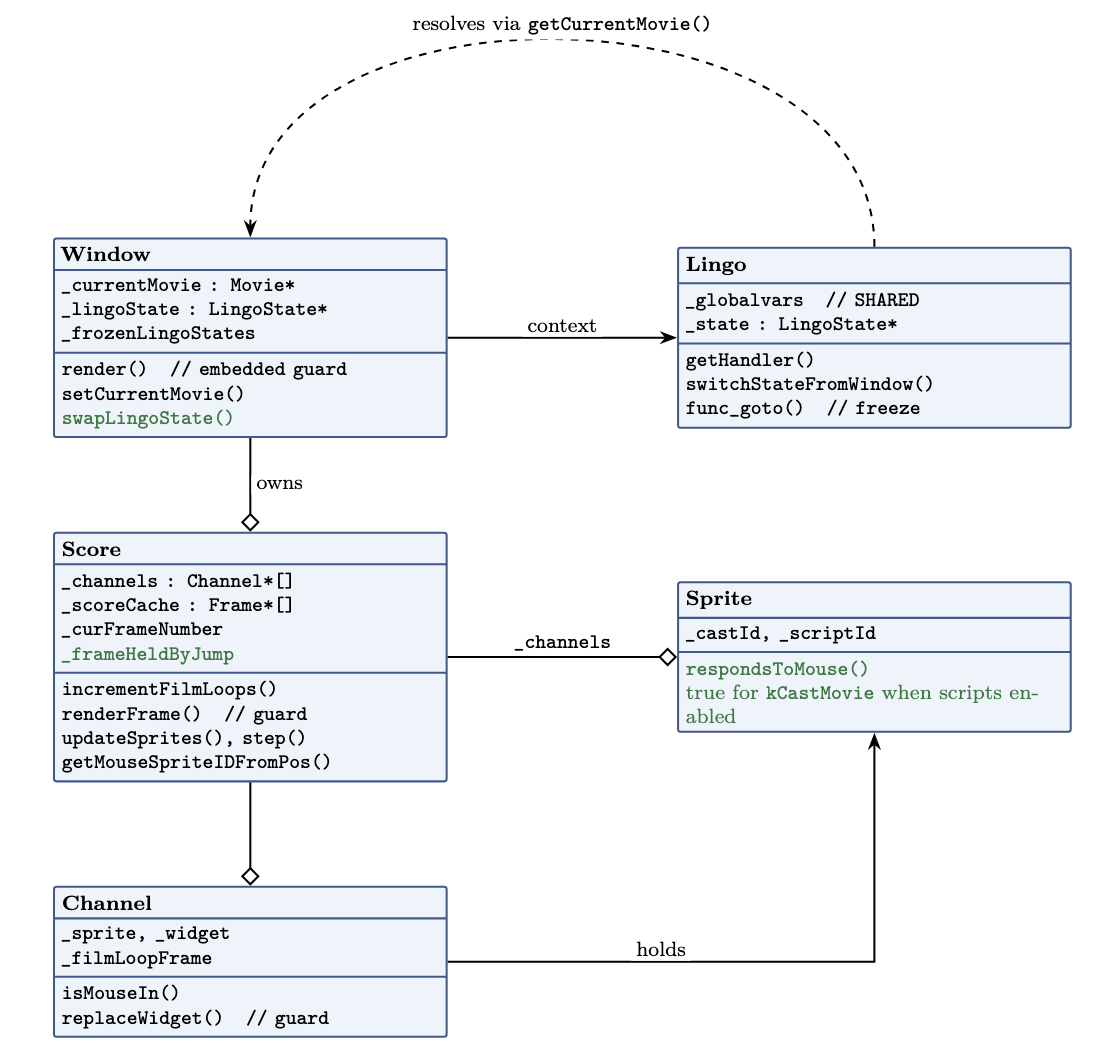
Where a movie cast member sits: it subclasses the film-loop cast member and owns a linked Movie, which points back at the host through _parentMovie.
Running in parallel
Here is the idea that organizes everything below, and it isn’t mine, sev handed it to me at the start: a movie cast member is a Window that doesn’t own a window. A real ScummVM Window has its own current movie, its own execution state, and its own step. A movie cast member needs all three, but it has to borrow them from the host, use them for exactly one step, and give them back. Every fix in this post is a consequence of getting that borrow-and-return right.
Start with the step. Loading a movie is not the same as running one. A film loop is a flipbook: you just ask it for the sprites at frame N. A movie cast member has to step: run its frame scripts, honour go, fire its events, advance. So update() now steps the linked movie’s score exactly like a real movie does.
The word “exactly” hides a decision: how fast does it step? A movie has its own tempo channel, so should the mini-map run at its own tempo, independent of the host? Rather than guess, I built a test movie in Director 4: a host at one tempo with an embedded movie authored at a different one, each incrementing a visible counter, and watched what the original engine did. The counters stayed locked together. Under D4, a movie cast member ignores its own tempo channel entirely and advances once per host frame, no independent clock, no drift. I’ve only verified this for D4; if D5 or D6 differ, that’s the first thing I’d re-check.
Then there’s the question of whose movie is “current”. Almost everything in Lingo resolves against the current movie: go, handler lookup, cast lookup, the clickOn. If the mini-map’s go is going to move the mini-map and not the panorama, the linked movie has to be the current movie while it steps. So update() swaps the window’s current movie to the linked one, steps, and swaps it back. For the duration of one step, the embedded movie is the current movie, and everything in Lingo resolves against it.
Reaching out, and getting on screen
Two things fell out of the borrow that I hadn’t planned for. First, the mini-map’s scripts call handlers that don’t exist in the mini-map: levelblinker lives in the host. And they read cast members that also live in the host. The linked movie isn’t self-contained; it’s written assuming it can reach up into whatever movie loaded it. That gave Movie a second new member, _parentMovie, and handler and cast lookups now fall back to it when the embedded movie comes up empty. The mini-map simply doesn’t run without it.
This fallback makes this title work, and it might be the wrong general answer: Director also has shared and external cast libraries, and a message hierarchy with a specified order, and it’s possible the “authentic” fix for another game is one of those rather than “fall back to whoever loaded me.” I verified that the mini-map needs the parent for levelblinker and its cast lookups; I have not verified that “fall back to the parent” is what Director itself does in general.
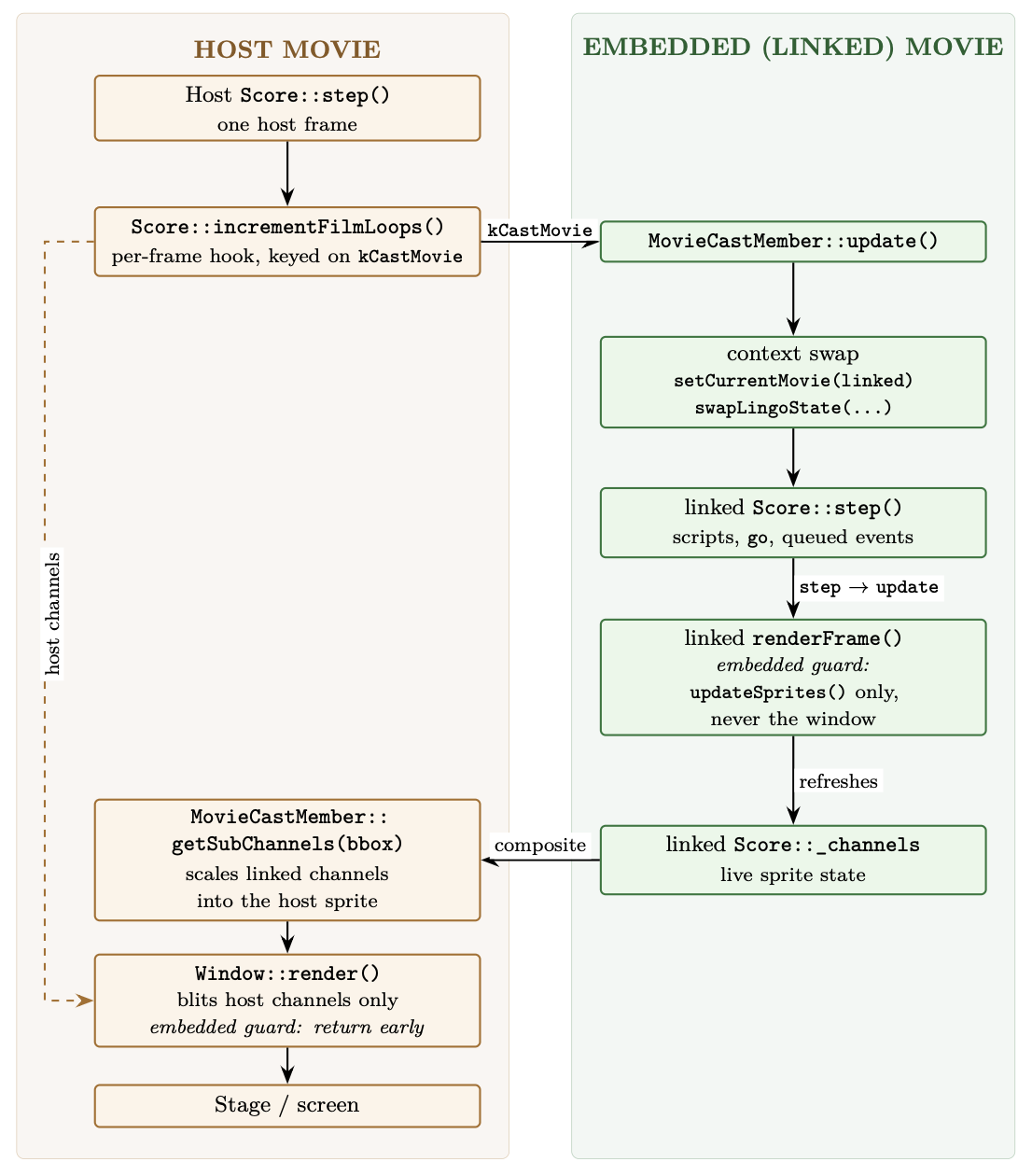
One host frame: the host steps the linked movie, which refreshes its own channels; the host then pulls those channels into the sprite through getSubChannels().
Second, getting the embedded movie’s pixels onto the screen. Rendering in ScummVM’s Director engine is pull-based: a window renders the channels of its current movie and nothing else. The embedded movie is never the window’s real current movie (only for that flicker of a step), so it can’t push itself onto the stage. Instead the host pulls: the embedded movie’s own renderFrame() refreshes its channels but, seeing _isEmbedded, stops short of drawing them anywhere, and then getSubChannels() takes those live channels, scales them into the sprite’s bounding box, and composites them. “Live” is the important word: it’s the actual running channels, so anything the mini-map’s scripts change shows up immediately.
Ghost in the corner
With all that in place the mini-map appeared, animated, and tracked my position. And it also drew a second copy of itself, small and wrong, jammed into the top-left corner of the stage.
My first guess was a highlight artifact, something about the sprite’s hilite flag drawing where it shouldn’t, so I tried guarding that. It didn’t help, and I dropped it.
The real cause was the pull-based rule again, from the other side. When the embedded movie stepped and called something that triggered updateStage, it went all the way into Window::render() and rendered its own channels onto the shared window, at the embedded movie’s native origin, which is the top-left of the stage. The composite path was doing its job in the sprite; this was a second, illegitimate path drawing the same content in the wrong place.
The guard I added is at the top of Window::render(): if the current movie is embedded, return immediately. It’s a guard; I’m discarding a render request that should never have travelled this far, rather than modelling what updateStage “should” do for an embedded movie in real Director. For this engine the invariant I want holds either way, an embedded movie reaches the stage through exactly one door, getSubChannels(), and no other. Ghost gone.
Two other things were wrong by this point, and I was ignoring both. Mouse events were piling up in the queue instead of draining. DT was flickering between two scores. Neither seemed connected to anything I’d just done, so I wrote them down and kept going.
Text that wouldn’t draw
The mini-map worked, but a piece of the host broke: the panorama’s description text (the caption that tells you what you’re looking at) stopped drawing. It rendered fine on master. Something in my branch had killed it.
I couldn’t see it by reading, so I bisected (kind of). First across the commit series: build each commit, run it, look for the text. One commit was fine, the next was broken, which pinned it to “run the movie cast member as a parallel movie”. That’s a big commit, so I bisected within it, as a designed ladder of four builds, each enabling one more thing than the last:
don’t step the embedded movie at all, text draws;
start the embedded movie but don’t step it, text draws;
step it, but skip the sprite update, text draws;
step it with frame-script execution, text gone.
The last rung was the one that broke, so the culprit was specific: the embedded movie running its own frame scripts.
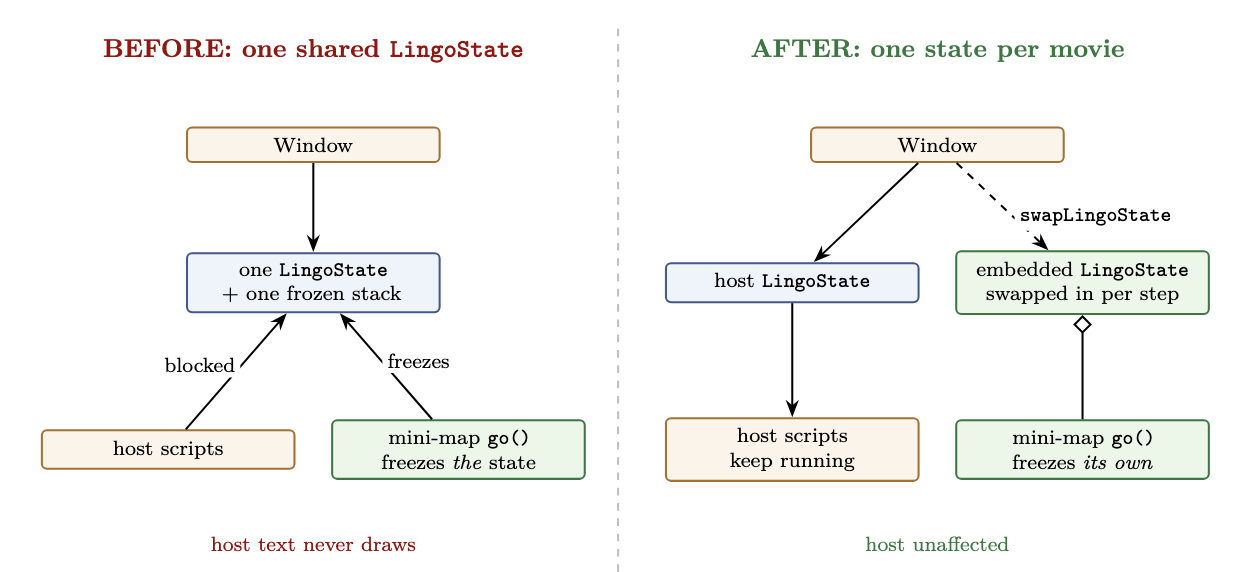
The invariant that was violated is small and exact. A Window owns one LingoState: a call stack, plus a stack of frozen states, which is how Director suspends a script mid-run to go do something else. That’s one thread of execution. The mini-map issues a go() on every single frame (that’s how it repositions the marker), and each go() freezes the current state and pushes it onto the window’s frozen stack. Because that stack was shared between the host and the embedded movie, the mini-map’s per-frame freeze kept pushing the host’s own scripts aside, and the script that draws the caption never got to run.
The fix is to stop sharing the one thing that must not be shared. The movie cast member now carries its ownLingoState, and a new Window::swapLingoState() exchanges it onto the window only for the duration of a step, then swaps it back. The mini-map’s go() now freezes the mini-map’s own state and leaves the host’s completely alone.
Before, one shared execution state, so the mini-map’s per-frame freeze blocked the host’s scripts. After, one state per movie, with the host’s left untouched.
Then the other two symptoms went quiet, and it took me a moment to see why, because they weren’t fixed by identical means.
The input queue drains only when the window isn’t mid-jump: in Score::step() the drain is gated on !hasJump and an empty frozen stack. With one shared frozen stack, the mini-map’s per-frame go() left the window permanently mid-jump, so the host’s routed mouse events had no frame in which they were allowed to drain. Isolating the state means the host is never mid-jump on the mini-map’s behalf; and because the mini-map is always mid-jump on its own behalf, update() drains its routed clicks explicitly, once per step. Same root cause, two coordinated fixes.
DT was flickering because it samples the window’s live Lingo state once per frame, and with a single shared state it had a real chance of sampling while the embedded movie owned it. The current-movie swap is still there, so DT can still land inside a step, but it now reads a state that belongs unambiguously to one movie instead of a half-updated shared one, and in practice the flicker is gone. I’d call this one strongly suspected rather than proven.
One shared LingoState; three symptoms.
Shared globals, private minds
It would be easy to conclude from all that the two movies should be walled off completely. They shouldn’t, and the mini-map is exactly why. Its whole job is a conversation with the host through shared globals: it reads gNodeNow to know where to put the marker, and writes gNewNode when you click to ask the host to travel. Wall the globals off and that conversation becomes impossible.
So the line to draw is between two things that get lumped together as “state”. Global variables stay shared: they live on Lingo, one table, host and embedded both reading and writing it; that’s the communication channel. Execution state (the call stack, the frozen stack, where each movie is in its own scripts) is private, one per movie.
Globals stay shared on Lingo; execution state is swapped per movie, one LingoState at a time on the window.
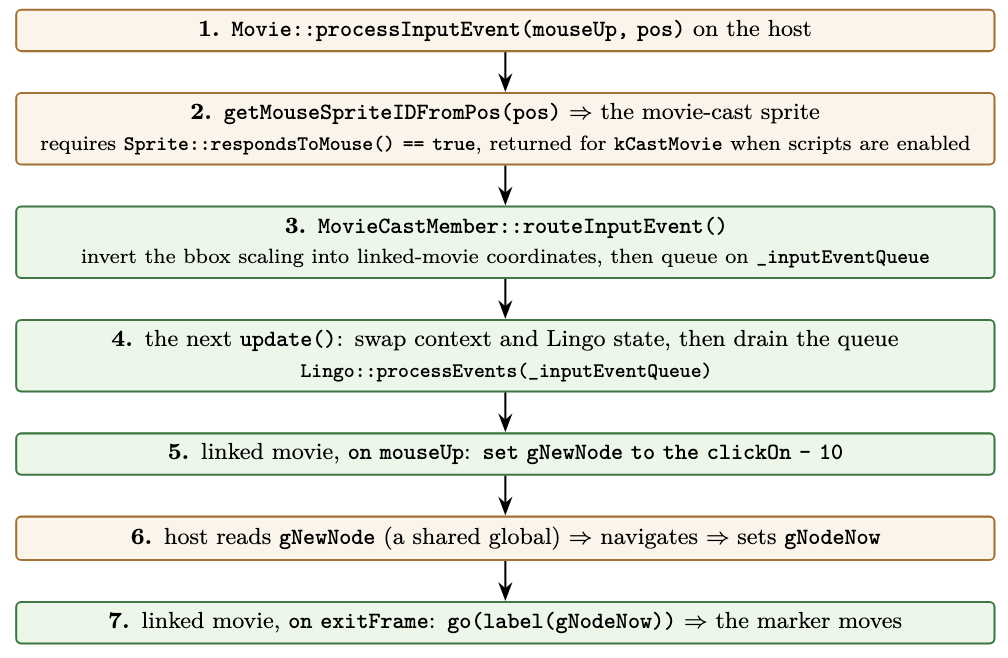
A click, end to end
The click is the whole design in one path, because it crosses the host/embedded boundary twice and the only things that cross with it are two globals. The diagram below traces all seven steps; the part worth saying in prose is the shape. Your click is hit-tested by the host, routed into the mini-map (with the bounding-box scaling inverted so the coordinates land in its own space), and handled by its on mouseUp as set gNewNode to the clickOn - 10 (the clickOn is the clicked sprite’s channel number; the - 10 is the mini-map’s own offset from channel to node id). From there it’s globals only: the host reads gNewNode, navigates, and writes gNodeNow; on its next exitFrame the mini-map reads gNodeNow and moves the marker. Two globals cross the boundary; everything else stays on its own side.
A click crosses the boundary twice; only gNewNode and gNodeNow cross with it.
Loose ends
A handful of things I closed, verified, or explicitly left open:
scriptsEnabled. The flag this all started with was decoded but never enforced, so a movie cast member always ran its Lingo. It’s now honoured: with scripts off, the linked movie is a passive flipbook. The lever already existed as Score::_haveInteractivity, which gates every event, frame scripts included, while a frame still advances underneath it, so the movie’s frames and channels update but no Lingo runs and it doesn’t respond to the mouse.
Blast radius of the hit-test change.Sprite::respondsToMouse() now returns true for a movie cast member (when its scripts are enabled). That’s an engine-wide function, but the change only adds a branch for kCastMovie; every other cast type takes the same path as before, so no other game’s click behaviour moves.
Regressions. These changes touch shared render and hit-test paths, so the check that matters is the engine’s D4 unit-test suite: it still passes at its baseline (196 pass, 11 pre-existing failures), unchanged from master. But there are places tests don’t cover.
Untested corners. One movie cast member on stage, single instance, is what I ran. Two at once, and a movie cast member nested inside a linked movie, are both things Director allows and I haven’t tested; the state swap is a two-slot exchange, and a robust version is probably a push/pop. I also haven’t profiled the per-frame cost of stepping a second score, though with one embedded movie it isn’t perceptible.
Moving in the panorama doesn’t move the map. Clicking the map navigates the panorama, but walking through the panorama doesn’t move the marker. The map is a pure consumer of gNodeNow, and the host only updates gNodeNow from its QTVR node-change path, so this is a QTVR-side gap, not a moviecast member one.
Where this is headed
Next up is the DT side, so the next person to open a movie cast member can watch both scores at once. None of the debugging above was done with a nice tool: it was rebuild-and-observe and reading the call graph, and DT itself was one of the broken things. Which is exactly the gap I want to close, and why this line from Zig’s creator Andrew Kelley (link to the quote) is the note I want to end on:
I needed to code up a simulation, I needed some visualization, I needed more introspection, I needed a way to understand what is happening, so that debugging wasn’t an all-day affair where I was using command line tools, but debugging could look like just looking at an animated graphic of what’s happening and just spotting the obvious problem and fixing it immediately.
When you have the right simulation, that’s what you can do. When your system is accessible, bugs are trivial.
It’s seven commits, building from reading the flag word correctly, through loading and playing the linked movie, to running it in parallel and finally isolating the Lingo state.
Back to a normal week after the midterm. It split cleanly in two: the first half closing out the debugger work I’d been carrying for a while, and the second half falling down a rabbit hole about film loops that I’m still in.
Closing out the debugger
The two fixes I said were nearly done last week both landed, along with a third that had been sitting on my “still on the list” note: the channel visibility toggle that did nothing while the movie was paused.
That one turned out to be a nice little bug. The debugger keeps a _windowToRedraw request, and it was being serviced inside onImGuiRender(), which runs after the frame has already been composited. During normal playback you never notice, because the next frame comes along a few milliseconds later and picks up the change. But when the movie is paused, there is no next frame. The request sat there and was serviced into a frame that had already been drawn, so the toggle appeared to do nothing at all. Draining the request in the main loop beforedraw() means it composites into the same frame, and the toggle works while paused.
I also gave the Cast window some overdue navigation help: a serial column in the list view, a toggle that overlays the member number on each tile in grid view, and a member count in the toolbar that shows shown/total when a filter is active. Small things, but this window is where you spend most of your time when a game’s cast is a thousand members long.
A different film loop bug
I wrote about film loops two weeks ago, but that was about where they get drawn, the registration point problem. This week’s bug is about when they move, and it turned out to be a much more interesting question.
The code that drives them is a single function, Score::incrementFilmLoops(). Every render tick it walks the channels, and for each one holding a film loop it bumps that channel’s frame counter by one. Simple, and mostly right, a film loop has no tempo of its own, so it animates in lockstep with the score that hosts it.
The problem is the “every render tick” part. It advanced regardless of what the playhead was actually doing. So a film loop kept animating while the movie was paused, and it kept animating while the playhead sat looping on a single frame. I had a suspicion both were wrong, but a suspicion isn’t a bug report.
Reading the manual
The books are the fastest way to settle these questions, except the ones I have are scans of 1990s manuals, and the OCR is rough. Searching a 670-page PDF for “film loop” returns nothing, not because the phrase isn’t there but because the OCR has rendered it as film loop, filmloop, film ]oop, and about six other things, with stray punctuation and line breaks landing in the middle of words.
sev pointed out the obvious thing I’d been ignoring; these books have indexes, and the index is a better entry point than search a lot of times.
That got me to the answer: film loops animate in step with the movie’s playback head. If the playback head isn’t moving, neither is the film loop. Director in a Nutshell (Epstein, 1999).
Asking the original
Books are good, but the actual application is better, so I built small test movies in real Director 4 and Director 5 to check each case directly. This is where it stopped being a one-line fix.
Pausing behaved as the book describes, the film loop freezes. ScummVM animated straight through it. Clear bug, and it applies to every version.
go the frame, a script that loops the playhead on a single frame, split by version. Director 4 freezes the film loop. Director 5 animates it. So this one needs a version check, not a blanket fix, and if I’d only tested in D5 I would have concluded there was no bug at all.
The tempo channel, a frame that waits a set number of seconds, was the interesting one, because ScummVM already gets it right, by accident of structure rather than by design. When the score is waiting on a tempo, isWaitingForNextFrame() returns early and renderFrame() never runs, so incrementFilmLoops() never gets called and the film loop freezes on its own. So no “fixing” here.
The fix, and checking it didn’t break anything
The change was pretty small, an early return when playback is paused, and a version gated check that tracks the last frame number the film loops were advanced on, so a playhead looping in place doesn’t count as movement in D4.
The part I want to note is the verification, because “small change” and “safe change” are not the same claim. The director-tests repo has a regression suite that runs a few hundred Lingo assertions across a stack of test movies. I ran it against my build: 196 pass, 11 fail. That number alone tells you nothing, you need to know what it was before.
So I checked out the parent commit, rebuilt clean master, and ran the identical suite: 196 pass, 11 fail, and the failing assertions were byte-identical once sorted. All eleven are pre-existing failures in event and play tests, none of which involve film loops.
That’s the difference between “I think this is fine” and “this changes nothing else,” and it’s the version I can put in a commit message.
Archaeology: this was tried once already
The reason I care about the film loop code is that it’s the foundation for the thing I’m working on now, movie cast members, which are Director’s way of embedding a whole linked movie as a single sprite. Where a film loop is inert animation, a movie cast member keeps its own scripts and sound. ScummVM’s MovieCastMember currently inherits from FilmLoopCastMember and overrides almost nothing, so today it renders as a silent, non-interactive animation and the flag that says “run this movie’s scripts” is parsed and then ignored.
Before starting I went looking for prior art and found sev had a director-moviecast branch. It took a while to work out what happened to it, because the merge base pointed somewhere confusing, the answer is that it was merged and then reverted. The revert message is the useful part: the approach drove the embedded movie by calling step() on its score, which was gated by _nextFrameTime and had unsafe side effects, including resetting video playback. It fixed a walking animation in Mission to Planet X and broke other things.
sev’s view is that movie casts need rewriting from scratch on the film loop approach, and having read the revert I understand why. Knowing exactly where the previous attempt hit the rocks is worth more than a clean slate.
Still on the list
Starting the rewrite itself. The design question I’ve been chewing on is how an embedded movie “runs at the same time” as the movie hosting it, and the answer is that it doesn’t, not in the way the phrase suggests. Director’s concurrency is cooperative, the main loop steps the stage’s score one tick, steps each open window’s score one tick, and composites once. Nothing runs in parallel; everything is interleaved on a single thread, and the deterministic ordering that gives you is a feature, because scripts fire at defined frame boundaries.
Tempo works the same way, as a clock rather than a counter: each score records the wall-clock time its next frame is due, and holds its current frame until that time arrives. Two scores at different tempos coexist because each gates on its own deadline. So an embedded movie doesn’t need a thread and doesn’t need to skip frames, it needs its own deadline, and one step per tick when that deadline comes due.
So after I discuss further with sev and have a solid plan of what to do, I’ll start the coding.
Gus Updates??
Gus Goes to The Kooky Carnival is now bug-free (from my testing). Once sev green lights it, it will be put into release. Other than that I am shifting my focus to movie cast members, away from gus games. for now.
Quick update this week. I didn’t get as much done as usual, life got in the way a bit, but there was still some progress worth writing about.
The big news first
I passed the GSoC midterm evaluation! Halfway through the program now, and it feels good to have the first half officially signed off.
Most of my work this week went into the visual debugger for the Director engine. A while ago I did a deep audit of the debugger code, going file by file and noting down everything that looked wrong, from crashes to small UI annoyances.
This week that work landed upstream as a set of thirteen commits. Among other things, it fixed several crashes when switching movies with debugger windows open, a memory leak in the Score window, breakpoint toggles that only worked on the first row, cast members that were silently missing from the Cast window filters, and a bunch of windows that could not tell you which movie they were looking at.
It also added a couple of small features, like being able to open a sprite’s behavior script directly from the Score window.
After the merge, sev tested the debugger against real games and reported a fresh batch of issues, which is what I am working on now.
Two fixes are almost ready: one makes the call stack in the Execution Context properly show where execution sits in each handler when you click through the stack frames.
The other fixes the Cast window, which could show an empty details panel for some cast members and stopped rendering its list partway through on games with very large casts, like Jewels of the Oracle.
Still on the list
The channel visibility toggle does not take effect while the movie is paused, so that is next up.
That’s it for this week. Shorter update than usual. See you in the next one.
When you fix a bug in a normal program, you fire up gdb or lldb, set a breakpoint, and step through the code. But what do you do when the “program” is a Macromedia Director game from 1995, written in a scripting language whose interpreter died two decades ago?
You build your own debugger. This post is a tour of DT (debugtools), the ImGui-based visual debugger built into ScummVM’s Director engine, which I have been working on since February.
DT was started by other ScummVM developers before I arrived; my work has been rebuilding the Score window, adding several new windows, and hardening the whole thing. Consider this the companion piece to my weekly posts, the missing chapter about where all the “DT:” commits actually go, with the parts I built called out along the way.
Why a game engine needs its own debugger
ScummVM’s Director engine is a reimplementation of the Macromedia Director runtime. Director games are “movies”: a timeline (the score) full of sprites, backed by a library of assets (the cast), all glued together with scripts written in Lingo.
When a game misbehaves, the bug is usually not in ScummVM’s C++ but in the interaction between the game’s Lingo scripts and our reimplementation of Director’s behavior i.e it’s a behavior difference which can be fixed in the C++ code.
But, a C++ debugger can’t help much there. What you actually want to see is: what frame is the movie on, which sprites are on which channels, what script is executing, what are the Lingo variables, and what did the original Director do differently.
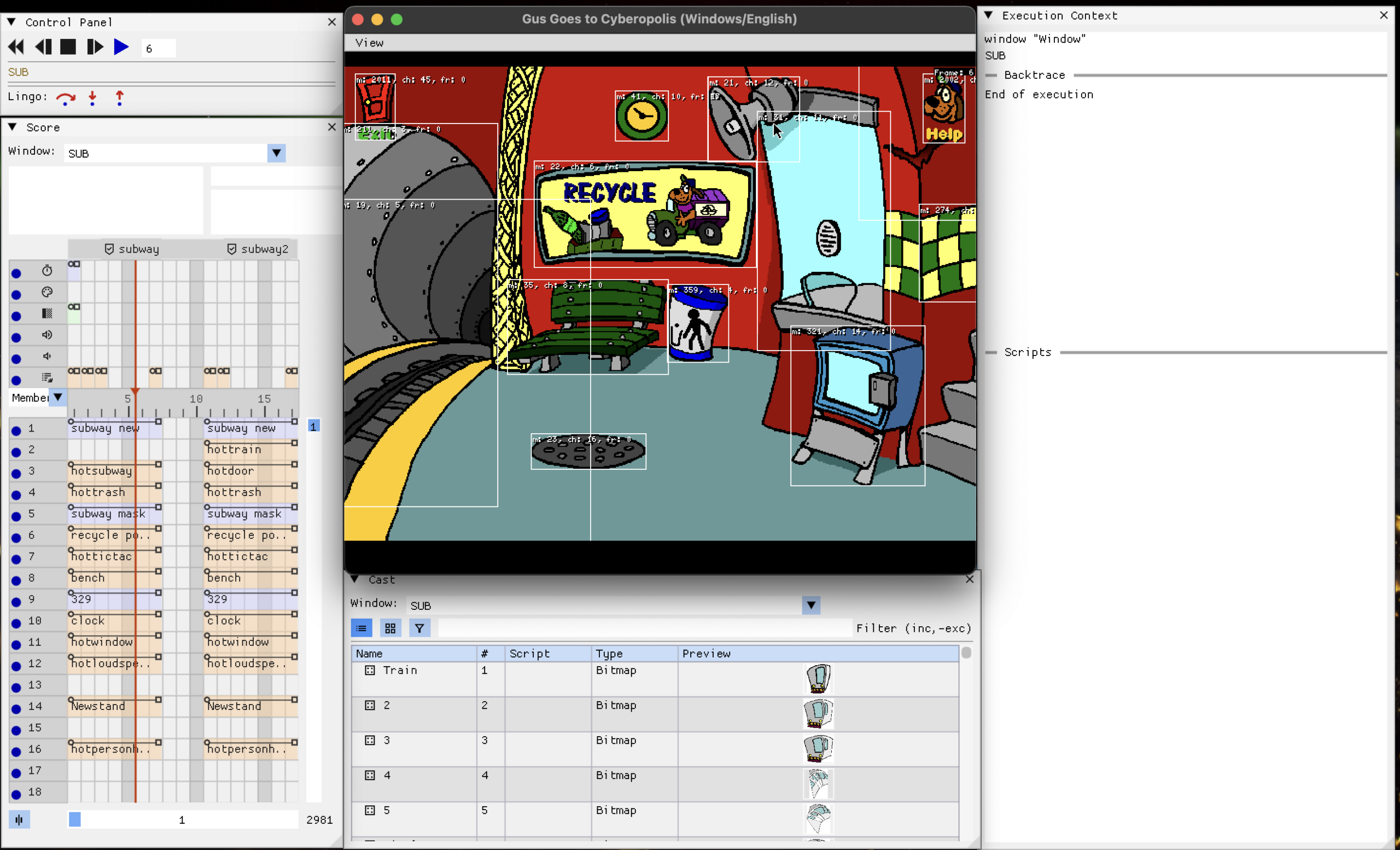
DT answers those questions. It runs inside ScummVM itself, drawn with Dear ImGui, and you get it by launching any Director game with --debugflags=imgui. The game keeps running in its window while the debugger windows float around it, live.
This is the debugger layout I currently use. Layouts can be saved / loaded by clicking view > save state / load state.
The white outlines you see around the objects is enabled using the draw all command in the console debugger (see immediately below).
The older sibling: the console debugger
DT is not the engine’s first debugger. One directory up, in engines/director/debugger.cpp, lives the classic console debugger: a gdb-style text prompt (it literally greets you with lingo)) reachable through ScummVM’s debug console. It speaks the vocabulary you would expect, bpset, step, next, finish, bt for backtraces, disasm for bytecode, plus Director-specific commands like channels, cast, and markers, and even a small Lingo REPL for evaluating expressions against the running movie.
The two debuggers are complementary rather than competing. They share the same underlying machinery, breakpoints set in one are visible in the other, and the same interpreter hooks drive stepping in both. The console is precise and scriptable; DT is spatial.
The architecture in one diagram
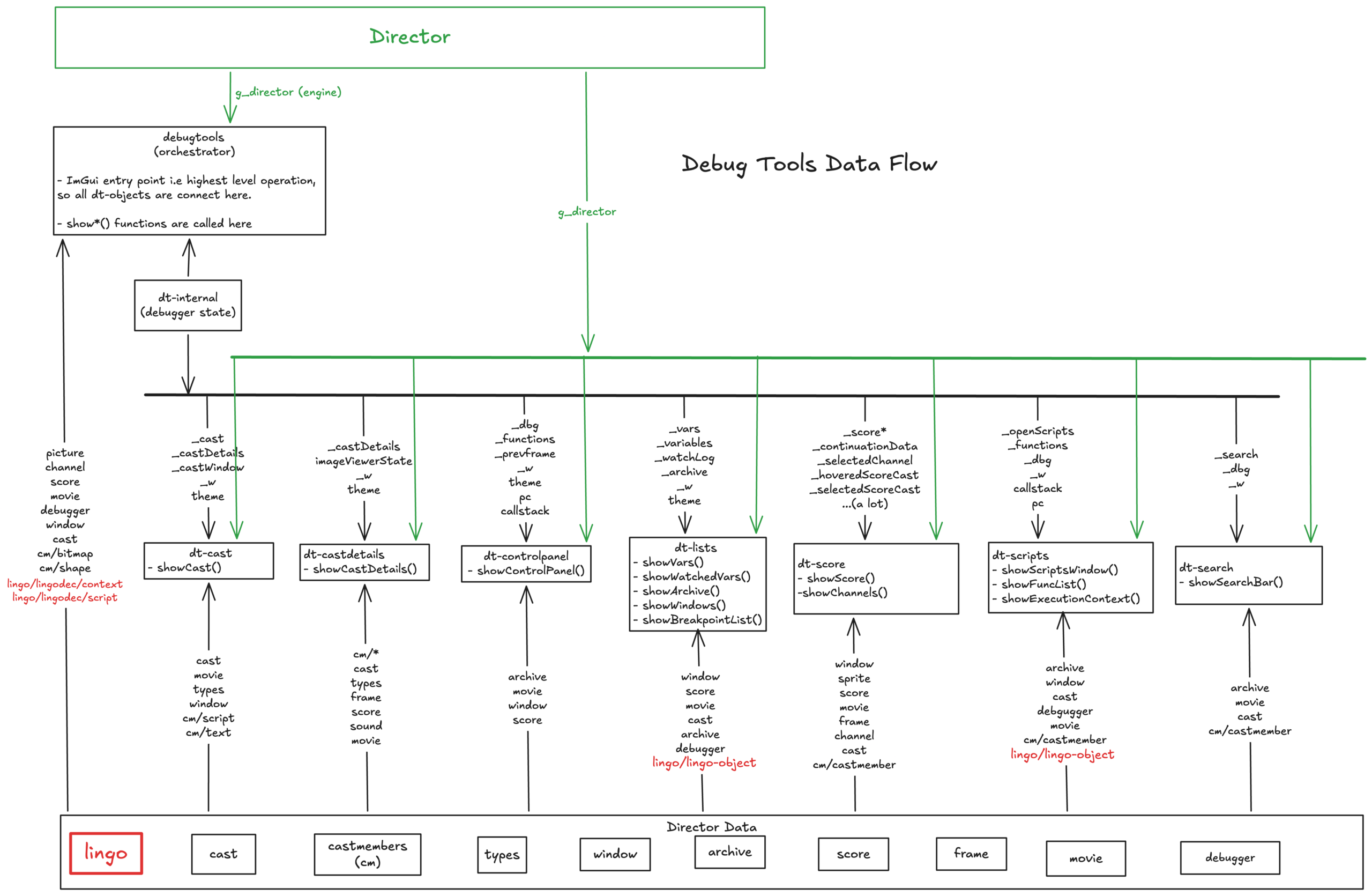
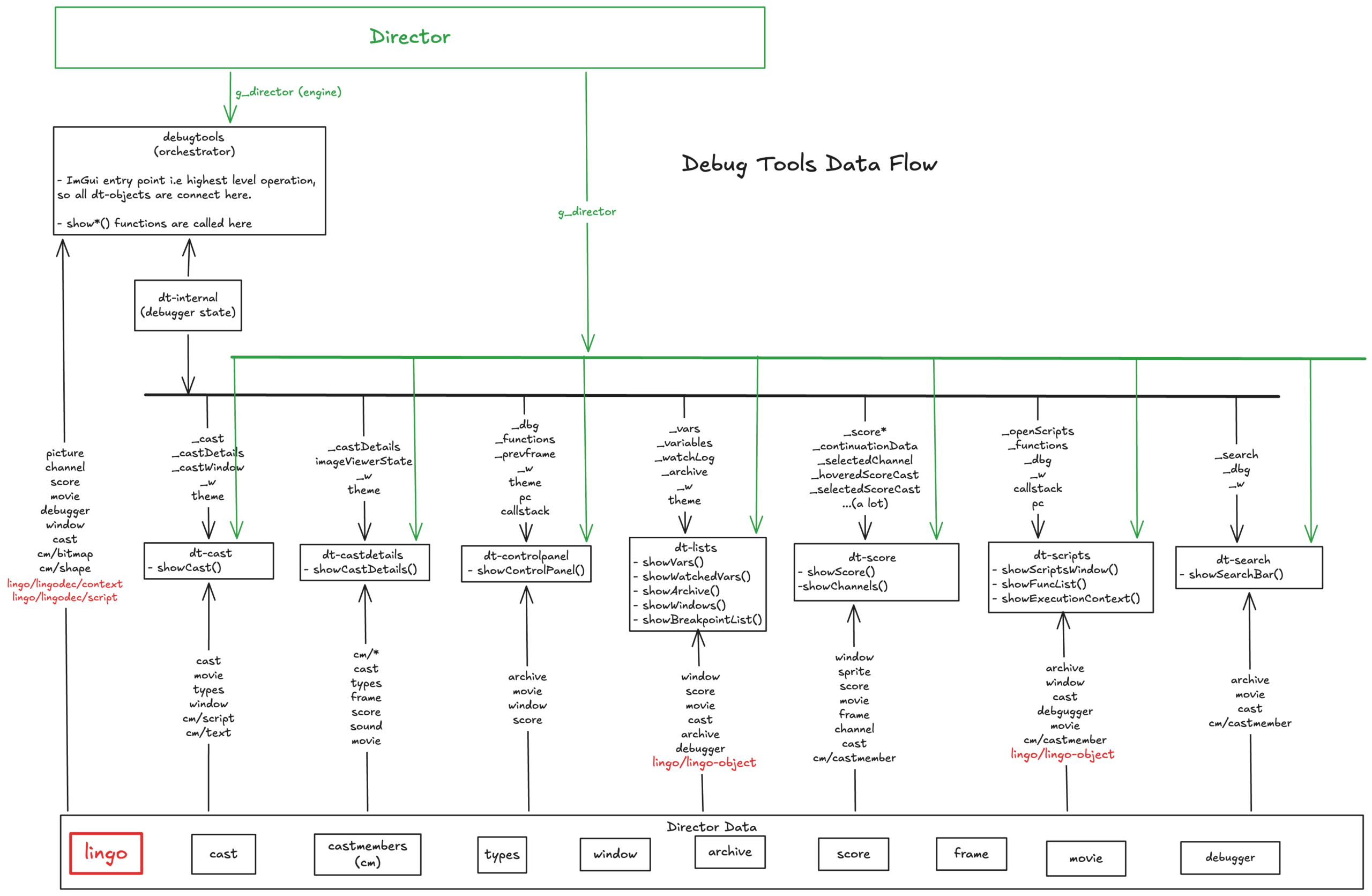
The whole debugger lives in engines/director/debugger/, about 8,600 lines across a dozen files, and follows a simple shape. debugtools.cpp is the orchestrator: it owns the ImGui entry point, and every frame it calls a show*() function for each window. dt-internal.h holds the shared debugger state, one big struct that remembers which windows are open, what is selected, cached textures, script history, themes, and so on. Each dt-*.cpp file is one window, and each window reads directly from the live engine objects: the current movie, its score, its casts, the Lingo state.
what data is sent where
Because ImGui is an immediate-mode UI, there is no retained widget tree. Every single frame, each window re-reads the engine data and redraws itself from scratch. That sounds wasteful but it is exactly what makes the debugger feel “live”: whatever the engine is doing right now is what you see, with no synchronization layer in between.
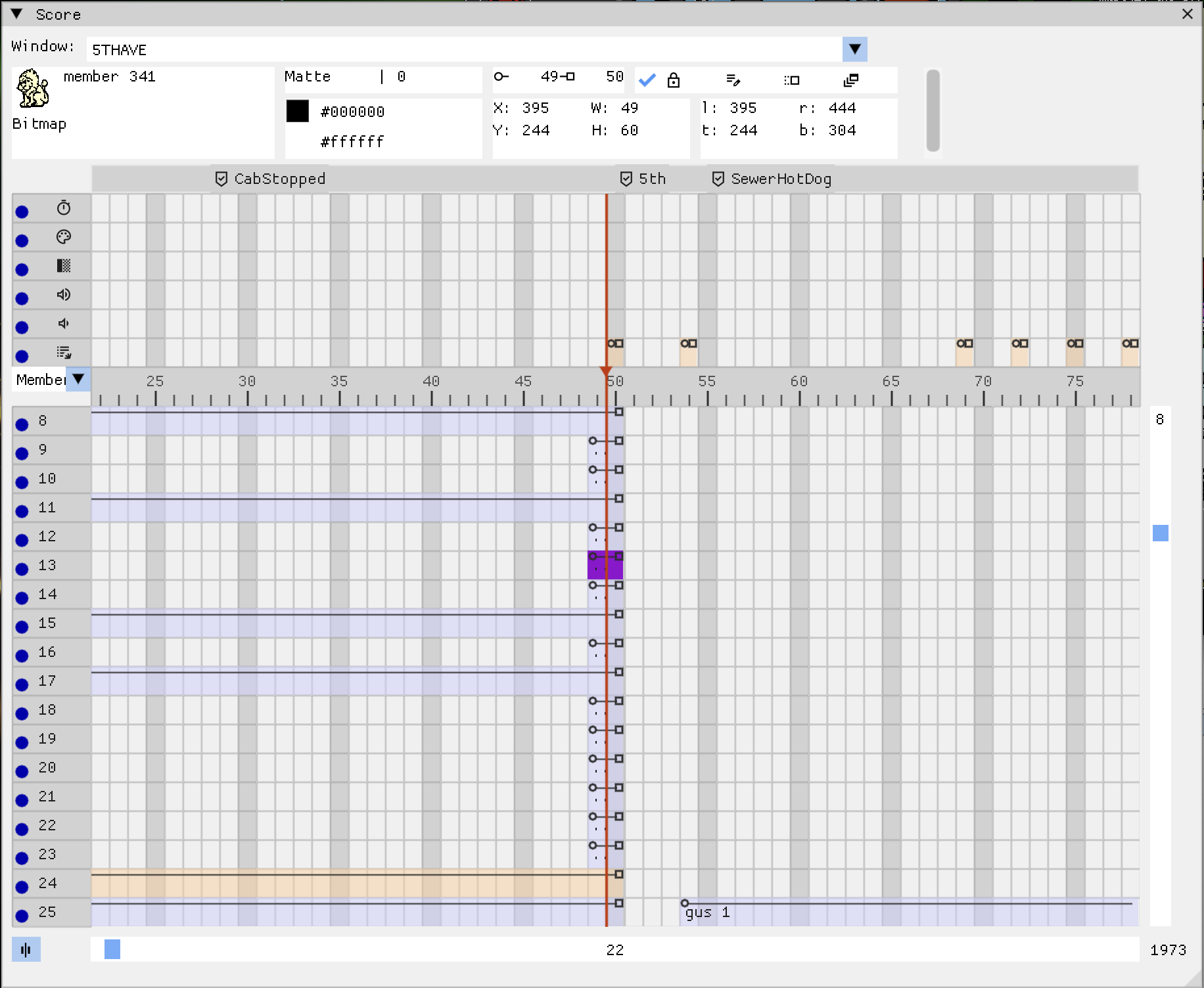
The Score window
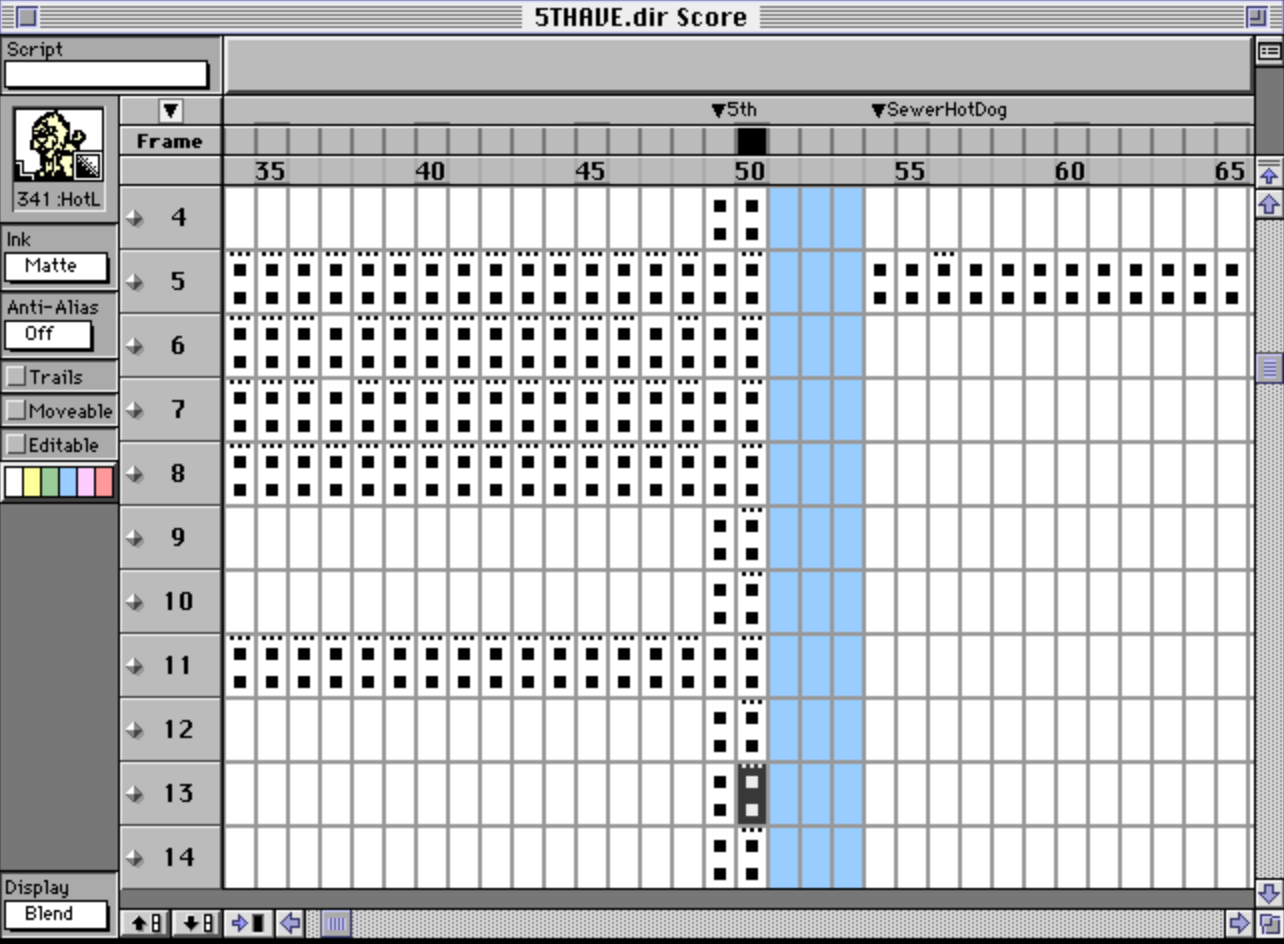
This was my first big project, and it is still my favorite. The score is Director’s timeline: a grid where rows are channels and columns are frames, and each cell says which cast member is on that channel at that frame. The original Director authoring tool had a famous score window, and game logic constantly jumps around the timeline, so you really want to see it.
The first version of the window was a plain ImGui table. It worked, but it could not look like Director’s score, and it fought the framework on things like custom cell decorations. So I rewrote it using ImGui draw lists, which are essentially a canvas API: you get rectangles, lines, triangles and text, and you draw the entire grid yourself. That rewrite (my first merged PR of the project) opened the door for everything that came after.
score of the imgui debugger
What the score window does today:
Sprite spans: consecutive frames where a channel holds the same sprite are drawn as one continuous bar with a start circle and an end square, exactly like Director drew them. Computing these spans means comparing every sprite against its neighbors across the whole score, so the result is cached per movie.
Display modes: the cells can show the cast member name, the behavior script, ink type, blend, location, or an extended multi-row view that shows all of them at once.
The main channels: tempo, palette, transition, and the two sound channels get their own rows above the sprite grid, again matching the original tool.
Navigation: horizontal and vertical scrolling (including mouse wheel), frame labels above the ruler, a playhead that tracks the current frame, and a center button that snaps the view to the playhead.
Interaction: clicking a cell selects the sprite and shows its details in an inspector strip (position, ink, blend, bounding box, flags), and double-clicking a frame jumps the movie there. That last one is dangerously fun.
score in the original director 4
The Cast windows
The cast is Director’s asset library: bitmaps, text, sounds, palettes, film loops, scripts, all numbered members. DT has a Cast browser with list and grid views, type filters, and thumbnails rendered from the actual cast member data, plus a Cast Details window that shows every property of a selected member, organized the same way Director’s own property dialogs were.
Some pieces of this I am particularly happy about:
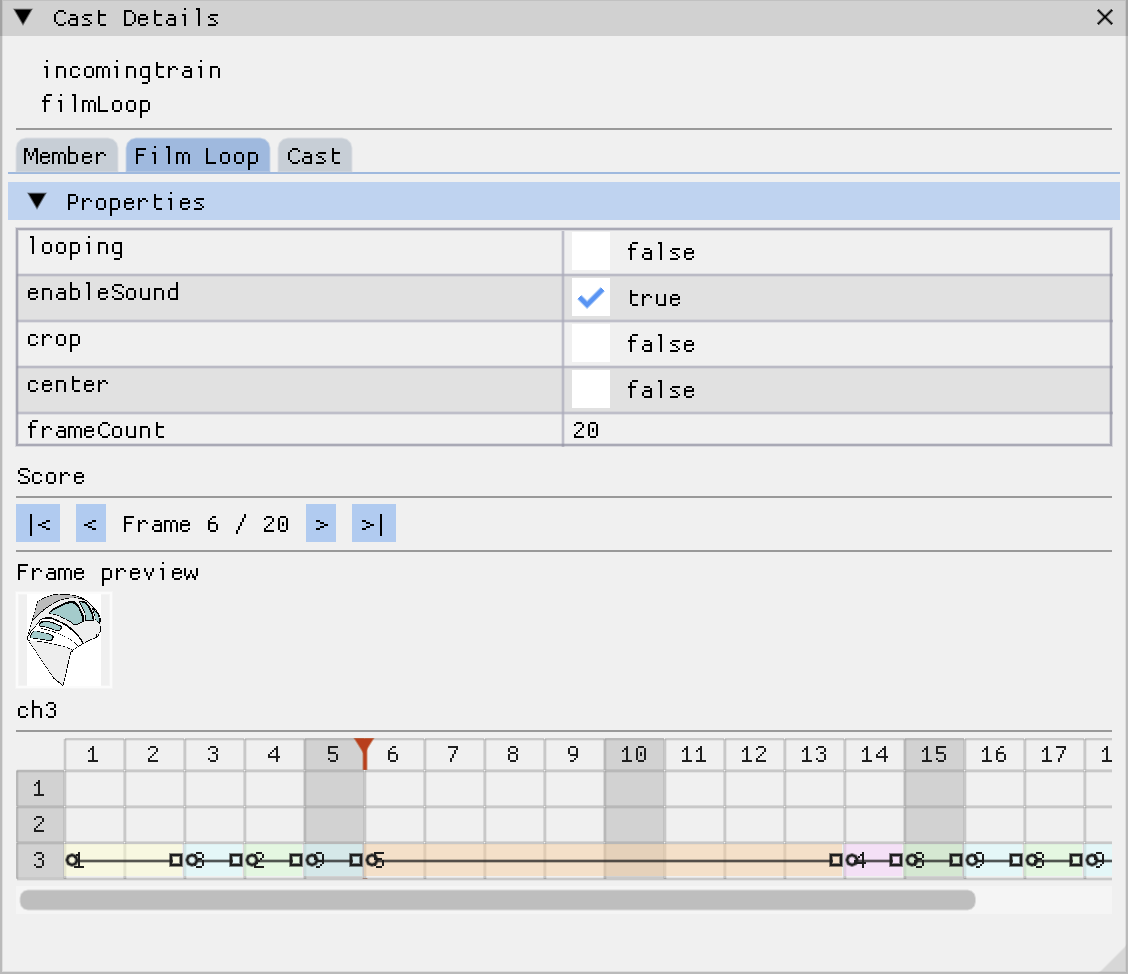
The film loop viewer. A film loop is an animation packaged as a cast member, and internally it has its own miniature score. So the details window renders a miniature score grid for it, with its own playhead and frame stepping, plus thumbnails of the sprites in the current frame.
Sound playback. Sound cast members get play and stop buttons, sample rate and channel info, and a table of cue points. The preview plays through the engine’s own sound manager on a reserved channel, so what you hear is what the game would play.
The image viewer. Clicking a bitmap or text member opens a dedicated viewer with zoom, pan, fit-to-window, and for text members, a tab showing the raw text with a copy button. Sounds trivial, but when you are comparing a rendered bitmap against a reference screenshot pixel by pixel, zoom and pan stop being luxuries.
mini filmloop viewer in the cast details window
Scripts: reading decompiled Lingo
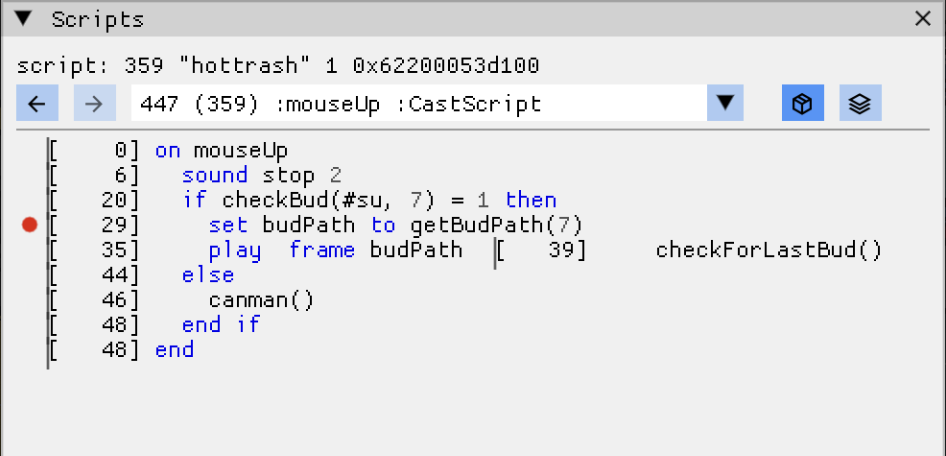
Director movies do not ship with Lingo source code, they ship compiled bytecode. DT shows you readable Lingo anyway, courtesy of LingoDec, a decompiler that reconstructs an AST from the bytecode. The script windows walk that AST and render it with syntax highlighting: keywords, builtins, literals, comments, each in their own color, with a bytecode view one toggle away.
And the scripts are not just text. Handler calls are links, click one and you jump to its definition. Variables have an eye icon, click it and the variable is added to a watch list. Each line has a breakpoint gutter.
The navigation used to be one floating window per handler, which collapsed the moment two scripts from different cast libraries shared a member number, since the windows were keyed by that number. I replaced it with a single Scripts window that works like a browser: an ordered history, back and forward buttons, and a dropdown of everything you have visited. Go-to-definition pushes onto the history, back pops you out.
the scripts window
Breakpoints plug into the Lingo interpreter itself. When execution pauses, the Control Panel offers step over, step into, and step out, implemented as small predicate functions that the interpreter calls after each instruction to decide whether to keep running.
Here is the entire step-over logic, to show how small these predicates are: The interpreter calls this after every instruction while running. Step into and step out are the same idea with the conditions changed: step into pauses on any line change or callstack change, step out only when the callstack gets shorter. The debugger does not drive the interpreter, it just answers “should we stop here” when asked.
The Execution Context window shows the call stack per engine window, and clicking a stack frame opens that handler at the paused line.
movie paused at a breakpoint
Finding things: Search and the Windows panel
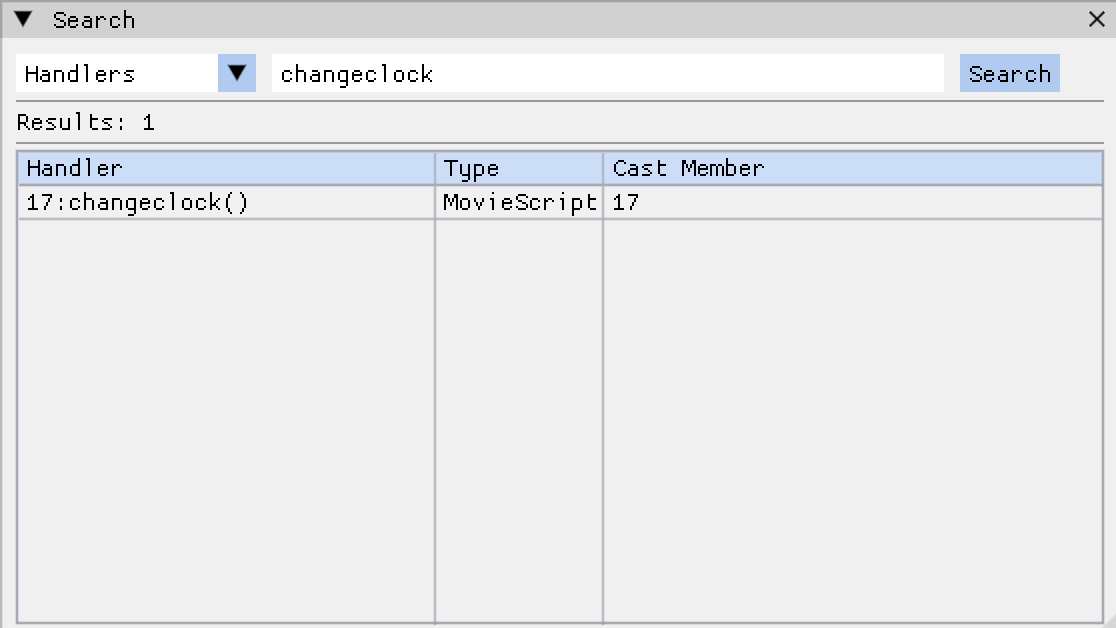
A Director game can contain hundreds of scripts across multiple cast libraries and a shared cast. The Search window greps them all, with modes for handler names, variable names (properties, arguments and globals), and full script bodies, the last one by decoding the compiled bytecode instruction by instruction. Results open in the script browser, and the matched text gets highlighted in the rendered script.
The Windows panel came out of debugging multi-window games (Director movies can open other movies in windows, and yes, that is as messy as it sounds). It lists every loaded window with its movie, play state and frame position, and below that, every .DIR file found in the game directory, click one and the engine navigates to it. That turned out to be the fastest way to explore a game’s movies one by one.
the search window
Two more windows deserve a mention here. The Vars window shows every global, local and property variable live, with changed values highlighted, and any variable can be added to a watch list that logs every write along with the script that did it, which is how you catch the question “who keeps resetting this flag”. And the Archive window is a raw resource browser: every chunk in the movie file, viewable as a hex dump, for the days when the bug is below the level of sprites and scripts entirely.
The stamp snapped back on drop, so: open the Score window and find which channels the stamp and slot live on. Click the slot’s sprite, see it script in the inspector, click through to the Scripts window and read the decompiled mouseUp handler.
Set a breakpoint on it, drag a stamp in the game, and watch the breakpoint never fire.
That single observation, visible in seconds, is the whole bug. The rest was C++.
Everything breaks, including debuggers
A recurring theme this summer: the debugger observes a live engine, and live engines change under you. Movies get switched, casts get destroyed, windows get closed, and every raw pointer the debugger cached becomes a landmine. A good chunk of my June work was a sweep through the whole debugger fixing null dereferences, out-of-bounds accesses, stale pointers and memory leaks, several of which I found by reading the code, looking at crash backtraces etc. and asking about every stored pointer: who deletes this, and does the deleter know we kept a copy?
That exercise changed how I write the feature code too. It is one thing to be told “don’t cache raw pointers to engine objects”, it is another to watch your own cast details window explode because the movie you were inspecting no longer exists.
None of this happened in a vacuum. Every one of these PRs went through review, and the pattern of feedback shaped the debugger more than any single feature: sev pushing back on fixes that need rework, and me reflecting on the review to make the code better.
What is left
DT is genuinely useful today, I use it daily to debug the Gus games, but there is plenty on the wishlist like making it more bullet proof, finding edge cases, adding new features.
If you want to try it: build ScummVM with ImGui support, add --debugflags=imgui to any Director game, and press Ctrl+2 through Ctrl+4 to toggle the main windows.
Things worth knowing on day one: Ctrl+F1 toggles mouse capture, so your clicks stop reaching the game while you arrange windows (hold Shift to click through temporarily); debugger windows can be dragged entirely outside the main ScummVM window if multi-viewport is enabled in Settings; and there is a light theme in Settings for people who debug in daylight. Bug reports welcome, I have become quite good at reading the crashes.
For anyone who wants to hack on DT, here is a map of engines/director/debugger/:
debugtools.cpp / debugtools.h: the orchestrator. Owns the ImGui lifecycle (onImGuiInit, onImGuiRender, onImGuiCleanup), the main menu bar, the keyboard shortcuts, and the theme definitions. Also home to the shared helpers everything else leans on: the texture cache for cast member thumbnails, toImGuiScript() for turning a handler into something renderable, and the script context lookups.
dt-internal.h: the shared state. One big ImGuiState struct that remembers which windows are open, current selections, script history, search results, cached vars, themes, everything that has to survive between frames. If two windows need to talk to each other, they do it through this struct.
dt-cast.cpp: the Cast browser window. List and grid views, type filters, name filter, thumbnails.
dt-castdetails.cpp: the Cast Details window with per-type property tabs (bitmap, text, rich text, shape, sound, film loop), the film loop mini-score viewer, and the image viewer with zoom and pan.
dt-controlpanel.cpp: playback controls (play, stop, rewind, frame stepping) and the Lingo stepping buttons. The step over/into/out predicates that the interpreter consults live here.
dt-lists.cpp: the grab bag of list windows: Vars (globals, locals, properties), Watched Vars with the write log, the Breakpoints list, the Archive resource browser with a hex view, and the Windows panel.
dt-score.cpp: the big one. The Score window (grid, spans, ruler, playhead, main channels, sprite inspector) and the Channels window showing the live state of every channel in the current frame.
dt-scripts.cpp: the Scripts window with its browser-style history, the Functions list, and the Execution Context window with per-window call stacks.
dt-script-d4.cpp: the renderer for decompiled Lingo. Walks the LingoDec AST and draws syntax-highlighted code with the breakpoint gutter, current-statement marker, and clickable handler calls. Used for Director 4+ bytecode.
dt-script-d2.cpp: the same job for older movies (D2/D3), which ScummVM compiles from source itself, so this walks ScummVM’s own AST instead of LingoDec’s.
dt-search.cpp: the Search window: handler names, variable names, and full body search by decoding bytecode.
dt-save-state.cpp: layout persistence. Serializes open windows, ImGui window positions, and settings to JSON so your debugging setup survives restarts.
This week was about closing out a drag-and-drop bug that had been bothering me, building test movies in real Director 4, and finally facing the AddressSanitizer. Let me walk through what happened.
The Post Office Bug
The centerpiece of the week. In Gus Goes to Cyberopolis, the post office letter minigame was broken: dragging a stamp onto the letter’s slot made it snap back to its tray every time, making the minigame unwinnable.
Some quick background for this one. A Director movie is composed of sprites, visual objects placed on numbered channels, and each sprite can have a script attached that reacts to events like mouseDown and mouseUp. Lingo (Director’s scripting language) also has a property called the clickOn, which returns the channel number of the sprite the user last clicked.
The game’s logic is simple: the stamp’s script handles mouseDown and starts the drag, and the slot’s script handles mouseUp and places the stamp. On release, the slot’s script asks the clickOn which channel was involved and checks whether it holds an empty slot. So for a drop to work, two things must happen when the mouse is released: the mouseUp event must be delivered to the sprite under the mouse (the slot, not the stamp), and the clickOn must return the slot’s channel.
Neither was happening in ScummVM. For Director 4 movies, mouseUp was being delivered using the sprite remembered from the original mouseDown, so the stamp’s script received the mouseUp. The stamp has no mouseUp handler, so the event fell through to the frame script, whose fallback logic snaps the stamp back to the tray. And the clickOn still pointed at the stamp’s channel from the original click.
Understanding this took a detour through Director’s message hierarchy, events are offered to the sprite’s script first, then the cast script, the frame script, and finally the movie script, with each level able to stop or pass the event along. Reading the game’s four scripts against a debugger session made it click.
The fix: deliver mouseUp to the sprite currently under the mouse for Director 4 movies, and update the clickOn when mouseUp lands on a sprite, so drop-target scripts can identify the target channel. Stamps now stick to letters.
NOTE: the fix is not final yet. Further discussion with sev will decide its final shape.
Building the Regression Test
Sev’s condition for the fix was tests, so I made some test movies in Director 4. The test suite in the director-tests repo uses a plugin (an “XObject” in Director terms) that can inject input events, move the mouse, press and release the button, and assert on the order in which handlers run, using a global counter.
The new test places two sprites on stage, presses the mouse on sprite 1, moves to sprite 2, and releases. Sprite 1’s script asserts it received the mouseDown; sprite 2’s asserts it received the mouseUp. Without the fix, sprite 2’s handler never fires and the assert count comes up short; with the fix, everything passes.
My first version attached the handlers to the cast members instead of the sprites, and the test failed for the wrong reasons, the handlers need to be sprite scripts to exercise the exact dispatch path the fix touches. I also added a screenshot call to last week’s text wrapping test, so that fix now has visual regression coverage against a reference image captured from real Director 4.
Film Loop Position Shift
A film loop is a Director cast member that packages a small animation so it can be placed on a channel like any static image. In the Kooky Carnival’s shooting gallery, animal sprites jumped to the wrong position when clicked.
When a script swaps a sprite’s image for another cast member at runtime, the new member may use a different registration point, the anchor that decides how the image is positioned. Normal bitmaps anchor at the top-left; film loops anchor at their center. ScummVM wasn’t adjusting the sprite’s position for that difference, so the sprite visually shifted by half its size on swap.
The fix saves the sprite’s on-screen bounding box before the swap and adjusts its position afterward, so it stays put. I had pushed a similar solution a long while ago, but it was in the wrong place. This one works.
What not to do
I had some uncommitted changes sitting on the buildbot server, which broke the imagediff tooling.
A refactor by sev had moved code from imagediff.py into main.py, and two things were left broken. First, main.py imported its config before running the sys.path bootstrap, so the dashboard could not load from a fresh start at all (ModuleNotFoundError: config). Second, screenshot_diff.py still imported from the old imagediff/imagediff.py module that no longer existed, so every ScreenshotDiffStep failed.
The fix moved the bootstrap before the config import, pointed the diff step at the new module, and cleaned out leftover debug prints and dead code. Merged.
Fortunately the uncommitted changes on the server were trivial and I was able to revert them.
Lesson learnt: do not leave unfinished work on prod servers (-_-) (use git, github).
My First Use-After-Free
While testing one of the Cyberopolis movies, ScummVM crashed when switching movies, but only in my AddressSanitizer build. This was my first time actively reading an ASAN report. As I was looking into this, I asked sev and after looking at the backtrace he found 2 commits which were the likely cuplrits.
The older commit, related to some changes in movie cast members, was the culprit. As this is a difficult bug, this will be taken care of by sev.
The visual debugger
Some DT changes have been made locally, but will finalize them and push the commits soon. Mostly bugs and crashes, nothing very interesting. And the DT blog is almost ready. Wasn’t able to work on it for a few days. Will publish in a day or two.
Next up:
– work on an animation speed bug
– continue on gus bugs
This week had a mix of bug fixes, debugger improvements, and game detection work. Let me walk through what happened.
Before I get into bugs, a quick note: I will be posting a separate blog on the visual debugger soon. Here is a snippet from a data flow diagram for the dt:
An Unresolved Bug
While testing Gus Goes to Cybertown’s Science Dome, I found a bug in the Sink or Float minigame: dropping the golf ball or spoon shows Prof. Gus’ face instead of the drop animation.
I traced it to cast member 525 (s_fqt, a digital video) on channel 14, which spans frames 7350 – 7359 during the drop animation.
In the original Director 4, this sprite is effectively invisible, its bounding box appears as three vertical dots on stage, not selectable or resizable. For the spoon case, no bounding box appears at all. ScummVM renders it at full size (240×180) instead.
The score stores the correct dimensions, setCast is called correctly, and the bbox passed to createWidget is right. So ScummVM is reading the data correctly – the original Director is doing something to suppress this sprite that we aren’t replicating yet. The likely culprits are the ink mode or a puppet flag, but I haven’t confirmed which yet.
Sev’s advice was to study the score at the exact frame where the original renders correctly; check ink, dimensions, and puppet flag, and look for any Lingo touching that channel. If the cause still isn’t clear, the plan is to strip the movie down to just the affected frames and cast members as a minimal test case, which can then live in the test suite to prevent future regressions.
This one is staying open for now. Sev also pointed out that since this bug is complicated, it’s worth finishing a sweep of all the Gus games first to find something simpler to close out, which is the plan for the coming week.
Text Wrapping
The next bug I tackled was text wrapping in D4 text cast members. Some labels like “Hamburger” were incorrectly wrapping as “Hamburge\nr”, one character too early.
The root cause turned out to be two separate issues. MacText treats maxWidth as the outer width and subtracts border, gutter, and shadow internally, so I was passing the wrong value and the effective inner wrap width was narrower than the cast member’s designed text area.
On top of that, wordWrapTextImpl was using > instead of >=, meaning text that exactly fills the available width was being wrapped onto a new line when it shouldn’t be.
Both are easy fixes in isolation, but finding them required understanding how the text layout pipeline chains together across three layers. The fix ships with a regression test in director-tests.
Debugger (DT): Script Viewer
While testing Gus Goes to Cybertown, clicking on some cast members in the Cast window showed the script tooltip on hover but opened nothing on click. The script viewer window stayed empty.
The issue has two parts. First, scripts using internal generic event handlers (scummvm_generic) were failing because getHandler() matched by handler.name == handlerId exactly, but generic event handlers store an empty name and are only identified by the isGenericEvent flag.
Matching on that flag when handlerId is “scummvm_generic” fixes it.
Second, some cast members return null from getScriptContext(), the root cause is still under investigation, but the scripts do exist and their source text is available in CastMemberInfo::script.
As a workaround, addToOpenHandlers() now falls back to displaying the raw Lingo source text when no compiled AST is available.
Sev shared a different D8 movie that had the same issue, which confirmed it’s not game-specific. The workaround covers that case too.
Gus Goes to Cybertown: Detection Entries
Gus Goes to Cybertown has three distinct Windows versions: Retail (Director 3), Retail Revised (Director 4), and Golden Master (Director 4). Each has different file sizes and hashes, so three separate detection entries were needed.
That was a summary of most of the things I did this week.
My next immediate goal is to fix the remaining gustown errors, and add it to release.
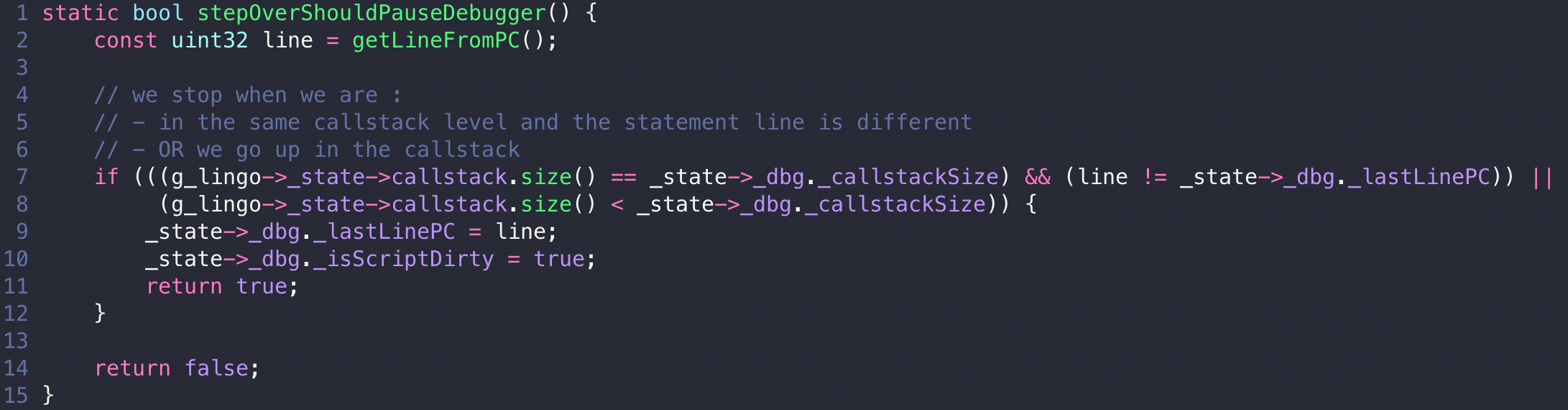 The interpreter calls this after every instruction while running. Step into and step out are the same idea with the conditions changed: step into pauses on any line change or callstack change, step out only when the callstack gets shorter. The debugger does not drive the interpreter, it just answers “should we stop here” when asked.