GSoC Week 1: Mouse Bugs, Rigged Minigames, and a Frozen Snake
This first week was full of detective work. Let me walk you through the three main mysteries I tackled.
Story 1: The Mouse That Lied to You
The game’s interaction system works by letting you hover over objects to highlight them, then click to interact. Early on I noticed something frustrating: hovering over an action worked perfectly — the cursor snapped to it and highlighted it — but the moment I clicked, the game would sometimes grab a different nearby object, or worse, produce a “not a good idea” failure message as if I’d clicked on empty space.
The hover and click paths were reading coordinates from different places.During a hover, the game samples cursor_x and cursor_y continuously from the
mouse movement events, so the position is always current. But on a click, the code was still using whatever position happened to be in those variables from
the last movement event, which could be slightly stale if the mouse had moved even a pixel between events. The fix was straightforward: latch the coordinates directly at the moment the button-down event fires.
case Common::EVENT_LBUTTONDOWN:
cursor_x = event.mouse.x; // capture position at click time
cursor_y = event.mouse.y;
mouseButtons |= 1;
break;
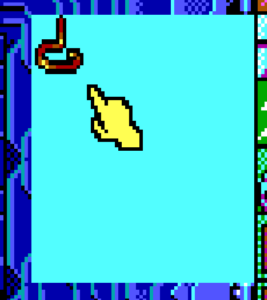
While I was deep in the input code, I also spotted that the cursor gave no visual feedback at all when hovering over interactive spots. The original game changed the cursor color on hotspots, but it was rendering pure white
regardless. A one-line fix in the EGA cursor renderer now makes the cursor turn yellow when over a hotspot and white otherwise — a small touch, but it immediately makes the game feel more alive and responsive.
Story 2: The Cups Game Was Always Rigged (And That’s Correct)
This was my favorite discovery of the week.
The game has a classic shell game — a character shuffles three cups, and you have to guess which one hides the skull. While testing it, I kept losing .The shuffle was to fast to track the cup, so it was pure luck. It felt like a bug, but something about the pattern nagged at me.
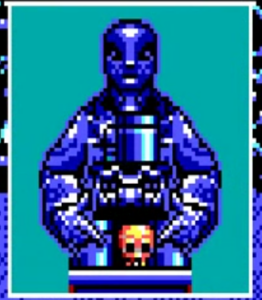
I pulled out the script disassembler and dug into the original game bytecode at offset 0xa76, where the ball’s cup position is calculated. The logic reads:
rand_value & 7 + 7
That expression generates a number in the range 7–14. But valid cup positions in the game’s data are only 7–12 (three cup positions × two states). So whenever the random number generator yields a 6 or 7 in the lower bits, the ball gets placed at position 13 or 14 — positions that don’t correspond to any cup.
My first instinct was to clamp the value. But then I stopped and checked if this was an accident or a feature. It’s not an accident — 25% of the time the ball is literally placed off the table, making it harder to win .
I will confess, though, that I temporarily hardcoded myself a 100% win rate just to bypass him and test the rest of the game, but rest assured, the final release will keep the authentic 25% scam rate entirely intact.
Story 3: The Snake That Wouldn’t Move Its Mouth
The third bug was the most technically satisfying to crack, and my mentor Sev deserves credit for pointing me toward the solution.
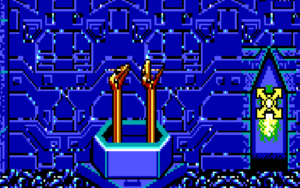
In the room called “The Twins”, there’s a snake you can interact with. You click OPEN on it, the game logic updates correctly (afterwards you can click SHUT , proving the internal state changed), but the snake’s sprite on screen
stays frozen in the closed position. The animation just never fires.
My first suspicion was a backbuffer issue — the game uses a software backbuffer for rendering, and maybe the wrong flush function was being called after the state change. I poked at SCR_5F vs SCR_11 for a while without getting anywhere.
Sev told me to run the script dumper on the original bytecode and compare what the EGA build was actually calling. When I dumped the scripts, the answer jumped out immediately: the sequence that handles the snake interaction ends with opcode 0x6B —RedrawRoomStatics. This opcode tells the engine to redraw all the static elements in the room and flush the backbuffer to screen.
The problem? Our opcode dispatch table only went up to 0x6A. The bounds check at the time was a hardcoded >= 107 (which is 0x6B in decimal), so the engine
hit opcode 0x6B, saw it was out of range, and silently aborted the script mid-execution. The state update had already happened, but the screen redraw command and everything after it was never reached.
The fix turned out to be surprisingly simple! The EGA version of the game used a slightly different command number to redraw the screen compared to the older CGA version. Our engine simply didn’t recognize this new command, so it just ignored it.
All I had to do was add the missing EGA command and link it to the existing CGA logic—essentially telling the engine, ‘Hey, this new command does the exact same thing as the old one.’ Finally, I updated the engine’s internal safety limits so that if it ever encounters another unknown command, it won’t just silently skip it.
 What’s Next
This week showed me how much of game archaeology this work involves. Sometimes you’re fixing your own code, sometimes you’re uncovering a 36-year-old intentional design decision, and sometimes you’re hunting a silent abort in a dispatch table.
Next week I’ll be looking at more EGA-specific rendering differences and continuing to close the gap between the CGA and EGA builds of the engine.
Thanks for reading — see you next week!