GSoC 2026 Final Report — Finishing Incomplete ScummVM Engines
Contributor: Ion Andrei Cristian · Organization: ScummVM · Coding period: 25 May – 17 August 2026
This is my final work product for Google Summer of Code 2026. It collects everything I worked on this summer in one place: what the project set out to do, what actually landed, where things stand now, and what is still open for whoever picks this up next.
THE PROJECT
ScummVM has a number of engines that are almost finished — the games boot, most of the logic is there, but something keeps them from being shipped: incomplete low-level graphics, legacy code structures inherited from a decompilation, or gameplay bugs nobody has sat down and tracked to the end. My proposal listed several such candidates. My mentor’s guidance was clear and, in hindsight, exactly right: rather than touching many engines superficially, take two of them all the way to a releasable state.
The two were:
-
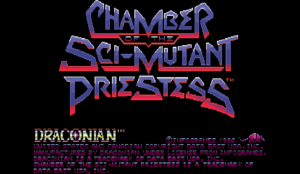
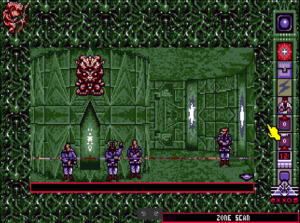
Chamber of the Sci-Mutant Priestess — a 1989 adventure by Delphine Software, whose ScummVM engine had a working CGA path but a broken EGA one, no Amiga support, and a long tail of gameplay bugs.
-
MacVenture — the engine behind Déjà Vu, Déjà Vu II, Shadowgate and Uninvited, which ran but crashed regularly and diverged from the original in ways that made the games unpleasant or impossible to finish.
One thing changed along the way. Chamber’s Amiga releases turned out to be a much larger and more interesting piece of work than anticipated — a whole second renderer, with planar graphics, a different palette system and two separate regional releases. I discussed it with my mentor and we agreed it was worth doing properly rather than skipping. It became roughly a third of the summer.
WHAT I DID
Chamber of the Sci-Mutant Priestess
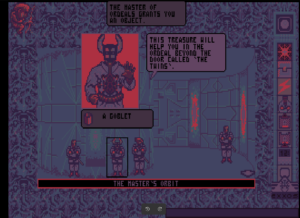
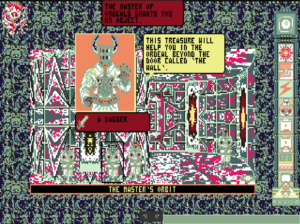
Getting EGA right. The EGA renderer was the headline problem. I fixed detection MD5s and title screen rendering, a transition that took twenty seconds on player death, mouse click coordinate latching, cursor hotspots, and implemented a missing script opcode. Later came a series of memory-layout bugs where EGA’s different buffer geometry caused writes to overflow into neighbouring structures and corrupt sprite lists and the backbuffer.
Gameplay and scripting. An infinite “you failed the ordeals” death loop caused by a timer bleeding across rooms. An endgame confrontation menu that re-prompted forever because a priority command never restored its stack pointer. An opcode whose operand width was wrong by one byte, silently desynchronising the whole script stream after it. Stale actors and commands surviving room transitions.
Randomness. The engine’s randomize() was a stub, so the seed was always zero and the sequence identical on every run — which made the same character spawn first in every single playthrough. The original seeded from the BIOS timer tick, and that seed is only the starting offset into a fixed table the game walks for its random values. I kept the table, so the distribution still matches DOS exactly, and took the offset from Common::RandomSource instead — which, on my mentor’s suggestion, also means the random_seed config key makes a run reproducible when you are chasing a bug.
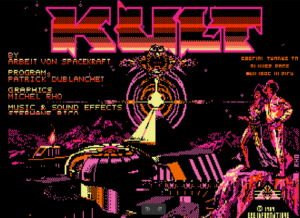
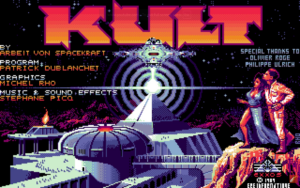
The Amiga port. This was the biggest single piece. I reverse-engineered the Amiga data formats — 16-colour four-plane bitplanes, 12-bit RGB palettes, the SPRIT/PUZZL sprite containers with their byte-swapped dimensions, the cursor format — and built a renderer that shares the EGA chunky pipeline while differing in palette and planar conversion. Then the same again for the US “Chamber” release, whose executable has a completely different static-resource offset table. Both the European “Kult” and US releases are now playable start to finish.
Save/load. Scripted room changes — the De Profundis monster, Deilos — lived only in the backbuffer and vanished when you reloaded. Version 2 of the save format stores the backbuffer.
Release work. Static analysis passes (Coverity and PVS-Studio findings), a detection fix for folders containing both CGA and EGA data (bug 17004), engine enabled by default, all variants promoted to testing.
MacVenture
Getting the data in. The Steam re-releases wrap the game data in a CEF application, with an HFS disk image buried in a PE resource. I wrote a devtools extractor for it, extended it to the Apple IIGS disks, and fixed IIGS detection, which had been silently dead because there was no data-fork fallback.
Crashes. Inventory windows closed out of order, a use-after-free where a window callback deleted its own data while the engine kept dispatching through the dangling pointer, an unsigned coordinate wrapping when you dragged an object off-screen, a double free in the CALL opcode when a script called a function that does not exist, a double delete in the text-input dialog. Plus one in shared MacGUI code, where past roughly 680 lines of scrollback the rectangle maths overflowed a 16-bit Common::Rect.
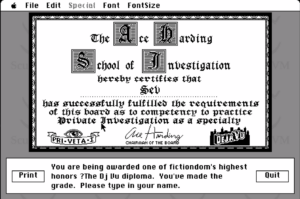
Making it behave like the original. Inventory window placement and sizing, lasso selection picking the wrong objects, Clean Up throwing items outside their window, the watch cursor while a command is processed, “click to continue” console paging, dialog buttons that invert while held and only act on release, shift-clicking to select several objects at once, and the diploma at the end of Déjà Vu actually being signed with the player’s name.
Timing. The SLEEP opcode computed (ticks / 60) * 1000, truncating every sub-second pause to zero, so animations flew past. And the GUI was forcing a full-screen refresh every frame, running the game at 17 fps instead of 50.
Two engine-level corrections. The random opcode returned a value inclusive of its maximum where the original returns one strictly below — every script indexing a table with it could read one past the end. And commands could not target the object they were invoked on, because a workaround for a duplicate-execution bug skipped the destination entirely; the real fix was to keep the destination out of the selection queue in the first place, as the original does.
Shared ScummVM code
Not everything was engine-local. Two fixes landed in shared code: an invalid-rectangle bug in the Mac GUI text renderer, a new absolute scrollTo() on MacTextWindow, and a SurfaceSDL regression that drew the game cursor several pixels off-target at scale factors above 1x — which affected every engine, not just mine.
CURRENT STATE
Chamber of the Sci-Mutant Priestess is enabled by default and all five variants are marked as testing. It is completable on CGA, EGA, Hercules, and on both the European and US Amiga releases. The Steam release is detected and playable.
MacVenture is in review for the same treatment. Déjà Vu is completable from start to finish. Déjà Vu II has been played to within sight of the ending and every blocking bug I hit along the way is fixed; the last stretch of the playthrough is the one piece of testing I did not get to finish. The two pull requests that enable the engine by default and promote the Macintosh releases to testing are open at the time of writing.
WEEKLY BREAKDOWN
Every week of the coding period has a blog post describing the work in detail. The pull requests for each week are listed alongside.
Week 1 – Focus: EGA detection, rendering and input; a rigged minigame and a frozen snake
Post: Week 1 Pull request: 7530
Week 2 – Focus: RNG seeding, ordeal timer death loop, state leaking across rooms, opcode operand width
Post: Week 2 Pull request: 7566
Week 3 – Focus: Confrontation menu stack overflow, sprite assembly coordinates, EGA zone transitions
Post: Week 3 Pull request: 7586
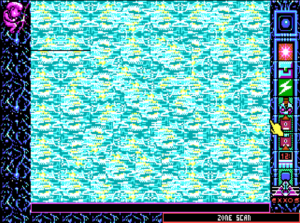
Week 4 – Focus: EGA memory layout overflows, timer endianness, zone scan width
Post: Week 4 Pull request: 7597
Week 5 – Focus: Amiga EU renderer: palette, sprite banks, script padding — playable end to end
Post: Week 5 Pull request: 7607
Week 6 – Focus: Amiga US release support, detection entries, zone scan effect; SDL cursor hotspot fix
Post: Week 6 Pull requests: 7629, 7628
Week 7 – Focus: Coverity and PVS-Studio findings; save format v2 storing the backbuffer
Post: Week 7 Pull request: 7629
Week 8 – Focus: Chamber enabled for release and promoted to testing; first look at MacVenture
Post: Week 8 Pull request: 7705
Week 9 – Focus: Steam and IIGS extraction tooling, IIGS detection, an uninitialised field causing assertions
Post: Week 9 Pull requests: 7722, 7726, 7728, 7748
Week 10 – Focus: Playing Déjà Vu through: Clean Up coordinates, console scrolling, watch cursor, animation pacing
Post: Week 10 Pull request: 7760
Week 11 – Focus: Inventory crashes, lasso selection, 17→50 fps, the signed diploma, click to continue
Post: Week 11 Pull requests: 7773, 7784, 7787, 7807
Week 12 – Focus: Déjà Vu II: script crashes, operate-on-itself, shift click, dialog buttons; release packaging
Post: Week 12 Pull requests: 7820, 7830, 7834
All pull requests are merged except 7830 and 7834, which are open and awaiting review.
WHAT IS LEFT TO DO
I would rather be honest about this than leave someone guessing.
In review. 7830 (enable MacVenture by default, add credits) and 7834 (promote the Macintosh releases to testing) are open. They are the last step before MacVenture can ship.
Finish the Déjà Vu II playthrough. I got very close to the ending, and the run was clean by that point, but the final stretch has not been played. It is a short job and the obvious first thing for anyone continuing this work.
Click to continue needs polish. The console now pauses and pages through long messages the way the original does, and it works — but the interaction is not yet as smooth as the real thing in every situation. It is functional, not finished.
Five sounds in Déjà Vu II do not play. Fifteen of the twenty work. The remaining five are not audio data at all: they are 68k CODE resources that the original played by executing them. Supporting them needs actual 68k emulation, which is well outside the scope of a bug fix.
Drawing mid-script is unsafe. MacVenture only assembles a fully consistent screen at the end of its main loop. Any attempt to draw from inside a running script (the opdeUPSC path) trips over half-built windows and invalid rectangles. I worked around it by pacing the main loop on elapsed time, which fixed the animations I needed, but the proper fix is a real animation path through the engine’s update cycle. Anyone attempting it should expect the crashes I did.
WindowData::bounds mixes coordinate systems. It holds content coordinates in some places and screen coordinates in others. I left this deliberately: updateWindow’s fillRect and the “mess up” logic both depend on the current behaviour, and untangling it safely is a refactor of its own rather than something to slip into a bug-fix branch. It is the single biggest source of coordinate confusion in the engine and worth doing properly.
Shadowgate and Uninvited need a full playthrough. MacVenture supports four games. I gave both of these a short look — they start up and play fine as far as I took them — but neither has had the sit-down-and-finish-it treatment that Déjà Vu and Déjà Vu II got. Given how much that turned up in the other two, I would expect a similar list from each.
Chamber has no per-language text support. The engine only distinguishes English (EN_USA) from non-English, so the French and German releases cannot be presented properly. Adding real per-language handling needs engine work, not just detection entries.
CHALLENGES AND LESSONS LEARNED
Coordinate systems were the theme of the summer. Clean Up throwing items out of their windows, lasso selection grabbing the wrong objects, inventory windows cascading off the bottom of the screen, the SDL cursor drawn several pixels off — all the same class of bug. What finally made the lasso one fall into place was not a clever insight, it was writing down explicitly which system each value was in: the mouse event is relative to the outer window, objects are relative to the content area plus scroll position. Once that was on paper the fix was obvious. I now do this first rather than last.
Reverse engineering without ground truth is slow, and you should go get ground truth. I spent a long time on the Amiga sprite bank encoding, trying chunky and every planar layout I could think of, and getting noise every time. The productive move — which I got to later than I should have — was to stop guessing at the format and go look at what the original executable actually does. Guessing scales badly; disassembly does not.
Old workarounds hide real bugs. My favourite fix of the summer was the Déjà Vu II flashlight doing nothing when you operated it. The cause was a workaround someone had added for a duplicate-execution bug: skip the destination while running the selection queue. It stopped the duplicate and also broke every command whose target is its own source. The lesson is that when a workaround produces a second symptom, the workaround is usually the thing to remove, not to extend.
Playing the game is the best bug report you can write. Weeks 10 through 12 were the most productive of the summer, and all I did was sit down and actually play the games with a notebook. Every bug I fixed in that stretch came from noticing something felt wrong, not from reading code — the same way I had found most of Chamber’s.
Check your build flags before you blame the engine. I lost time chasing jerky, stuttering gameplay that turned out to be a build configured with –enable-debug and no optimisations at all. The engine was fine.
Static analysis is worth a dedicated pass. Handing Coverity and PVS-Studio output a full afternoon surfaced real dead stores, leaks and uninitialised reads that no amount of playing would have found.
PRIOR CONTRIBUTIONS
For completeness, and to be clear about what belongs to the GSoC period and what does not: I was contributing to Chamber before the coding period began on 25 May. These pull requests are not part of my GSoC work, but they are the foundation the summer built on.
7267 · 7270 — splash screen refactor and Hercules palettes moved to the global graphics manager
7294 — Hercules scaling
7440 — initial EGA rendering
7474 — save/load support
7479 — splash screen filenames moved to detection flags
ACKNOWLEDGEMENTS
Thank you to my mentors, especially sev, for twelve weeks of steady guidance, quick reviews and genuine patience — including the times I turned up with a coordinate bug I had already been warned about. Thank you also to the wider ScummVM community for the review comments, and to Google for running the program.
Twelve weeks ago I had never touched either of these engines. Both are now heading for a release. That still feels slightly unreal.